Quantities

Author

Sara S

#|label: setup
library(tidyverse)
── Attaching core tidyverse packages ──────────────────────── tidyverse 2.0.0 ──
✔ dplyr     1.1.4     ✔ readr     2.1.5
✔ forcats   1.0.0     ✔ stringr   1.5.1
✔ ggplot2   3.5.1     ✔ tibble    3.2.1
✔ lubridate 1.9.3     ✔ tidyr     1.3.1
✔ purrr     1.0.2     
── Conflicts ────────────────────────────────────────── tidyverse_conflicts() ──
✖ dplyr::filter() masks stats::filter()
✖ dplyr::lag()    masks stats::lag()
ℹ Use the conflicted package (<http://conflicted.r-lib.org/>) to force all conflicts to become errors
library(mosaic)
Registered S3 method overwritten by 'mosaic':
  method                           from   
  fortify.SpatialPolygonsDataFrame ggplot2

The 'mosaic' package masks several functions from core packages in order to add 
additional features.  The original behavior of these functions should not be affected by this.

Attaching package: 'mosaic'

The following object is masked from 'package:Matrix':

    mean

The following objects are masked from 'package:dplyr':

    count, do, tally

The following object is masked from 'package:purrr':

    cross

The following object is masked from 'package:ggplot2':

    stat

The following objects are masked from 'package:stats':

    binom.test, cor, cor.test, cov, fivenum, IQR, median, prop.test,
    quantile, sd, t.test, var

The following objects are masked from 'package:base':

    max, mean, min, prod, range, sample, sum
library(ggformula)
library(skimr)

Attaching package: 'skimr'

The following object is masked from 'package:mosaic':

    n_missing
library(crosstable)

Attaching package: 'crosstable'

The following object is masked from 'package:purrr':

    compact
Organizing the dataset diamonds

glimpse(diamonds)
Rows: 53,940
Columns: 10
$ carat   <dbl> 0.23, 0.21, 0.23, 0.29, 0.31, 0.24, 0.24, 0.26, 0.22, 0.23, 0.…
$ cut     <ord> Ideal, Premium, Good, Premium, Good, Very Good, Very Good, Ver…
$ color   <ord> E, E, E, I, J, J, I, H, E, H, J, J, F, J, E, E, I, J, J, J, I,…
$ clarity <ord> SI2, SI1, VS1, VS2, SI2, VVS2, VVS1, SI1, VS2, VS1, SI1, VS1, …
$ depth   <dbl> 61.5, 59.8, 56.9, 62.4, 63.3, 62.8, 62.3, 61.9, 65.1, 59.4, 64…
$ table   <dbl> 55, 61, 65, 58, 58, 57, 57, 55, 61, 61, 55, 56, 61, 54, 62, 58…
$ price   <int> 326, 326, 327, 334, 335, 336, 336, 337, 337, 338, 339, 340, 34…
$ x       <dbl> 3.95, 3.89, 4.05, 4.20, 4.34, 3.94, 3.95, 4.07, 3.87, 4.00, 4.…
$ y       <dbl> 3.98, 3.84, 4.07, 4.23, 4.35, 3.96, 3.98, 4.11, 3.78, 4.05, 4.…
$ z       <dbl> 2.43, 2.31, 2.31, 2.63, 2.75, 2.48, 2.47, 2.53, 2.49, 2.39, 2.…
skim(diamonds)
Data summary
Name diamonds
Number of rows 53940
Number of columns 10
_______________________
Column type frequency:
factor 3
numeric 7
________________________
Group variables None

Variable type: factor

skim_variable n_missing complete_rate ordered n_unique top_counts
cut 0 1 TRUE 5 Ide: 21551, Pre: 13791, Ver: 12082, Goo: 4906
color 0 1 TRUE 7 G: 11292, E: 9797, F: 9542, H: 8304
clarity 0 1 TRUE 8 SI1: 13065, VS2: 12258, SI2: 9194, VS1: 8171

Variable type: numeric

skim_variable n_missing complete_rate mean sd p0 p25 p50 p75 p100 hist
carat 0 1 0.80 0.47 0.2 0.40 0.70 1.04 5.01 ▇▂▁▁▁
depth 0 1 61.75 1.43 43.0 61.00 61.80 62.50 79.00 ▁▁▇▁▁
table 0 1 57.46 2.23 43.0 56.00 57.00 59.00 95.00 ▁▇▁▁▁
price 0 1 3932.80 3989.44 326.0 950.00 2401.00 5324.25 18823.00 ▇▂▁▁▁
x 0 1 5.73 1.12 0.0 4.71 5.70 6.54 10.74 ▁▁▇▃▁
y 0 1 5.73 1.14 0.0 4.72 5.71 6.54 58.90 ▇▁▁▁▁
z 0 1 3.54 0.71 0.0 2.91 3.53 4.04 31.80 ▇▁▁▁▁
inspect(diamonds)

categorical variables:  
     name   class levels     n missing
1     cut ordered      5 53940       0
2   color ordered      7 53940       0
3 clarity ordered      8 53940       0
                                   distribution
1 Ideal (40%), Premium (25.6%) ...             
2 G (20.9%), E (18.2%), F (17.7%) ...          
3 SI1 (24.2%), VS2 (22.7%), SI2 (17%) ...      

quantitative variables:  
   name   class   min     Q1  median      Q3      max         mean           sd
1 carat numeric   0.2   0.40    0.70    1.04     5.01    0.7979397    0.4740112
2 depth numeric  43.0  61.00   61.80   62.50    79.00   61.7494049    1.4326213
3 table numeric  43.0  56.00   57.00   59.00    95.00   57.4571839    2.2344906
4 price integer 326.0 950.00 2401.00 5324.25 18823.00 3932.7997219 3989.4397381
5     x numeric   0.0   4.71    5.70    6.54    10.74    5.7311572    1.1217607
6     y numeric   0.0   4.72    5.71    6.54    58.90    5.7345260    1.1421347
7     z numeric   0.0   2.91    3.53    4.04    31.80    3.5387338    0.7056988
      n missing
1 53940       0
2 53940       0
3 53940       0
4 53940       0
5 53940       0
6 53940       0
7 53940       0

Creating graphs according to price

gf_histogram(~price, data = diamonds) %>%
  gf_labs(
    title = "Plot 1A: Diamond Prices",
    caption = "ggformula"
  )

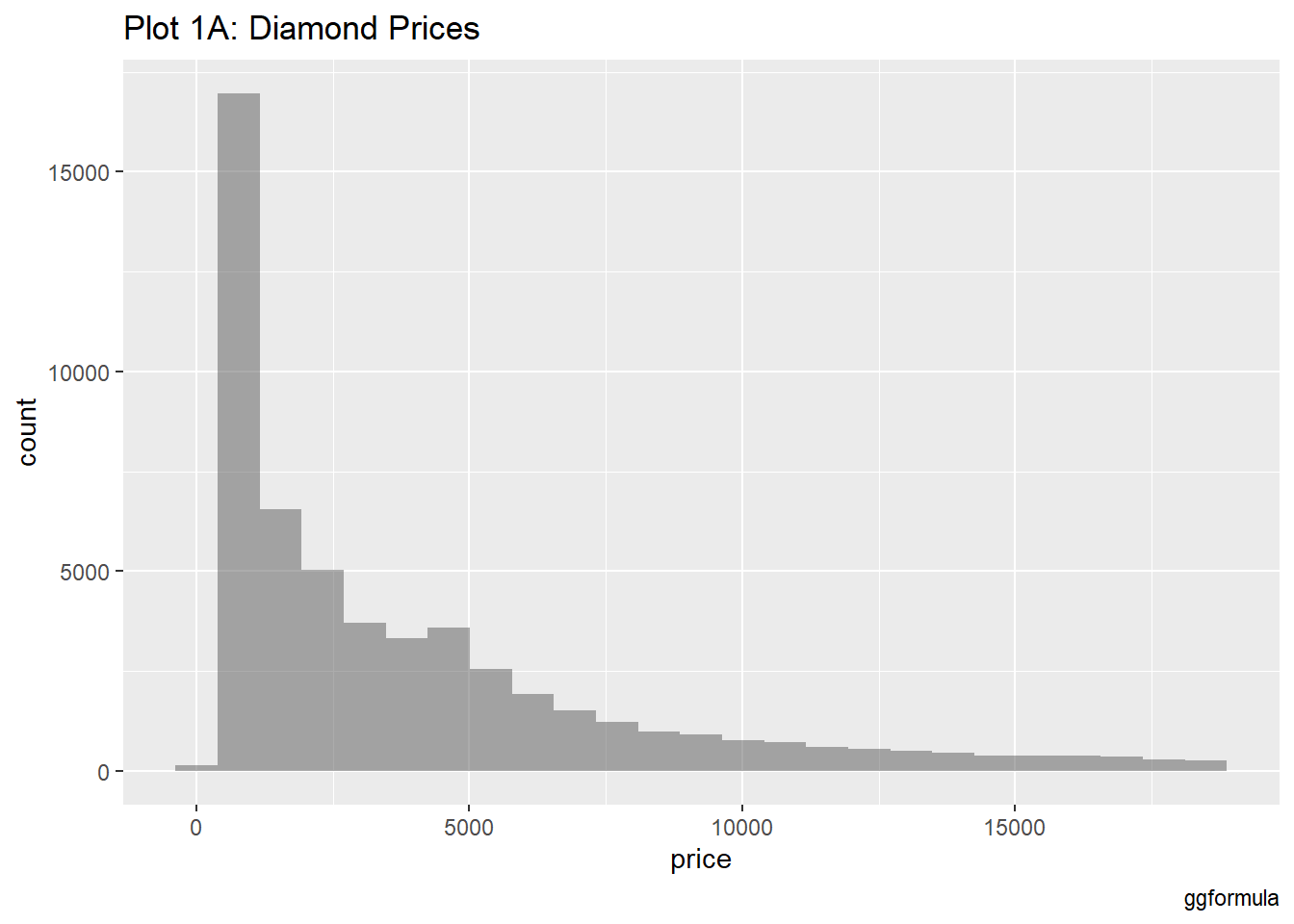
The histogram shows the distribution of diamond prices. It reveals that most diamonds are on the lower end of the price spectrum. There is a significant right-skewed distribution, indicating that high-priced diamonds are less frequent.

Creating graphs according to price and bins

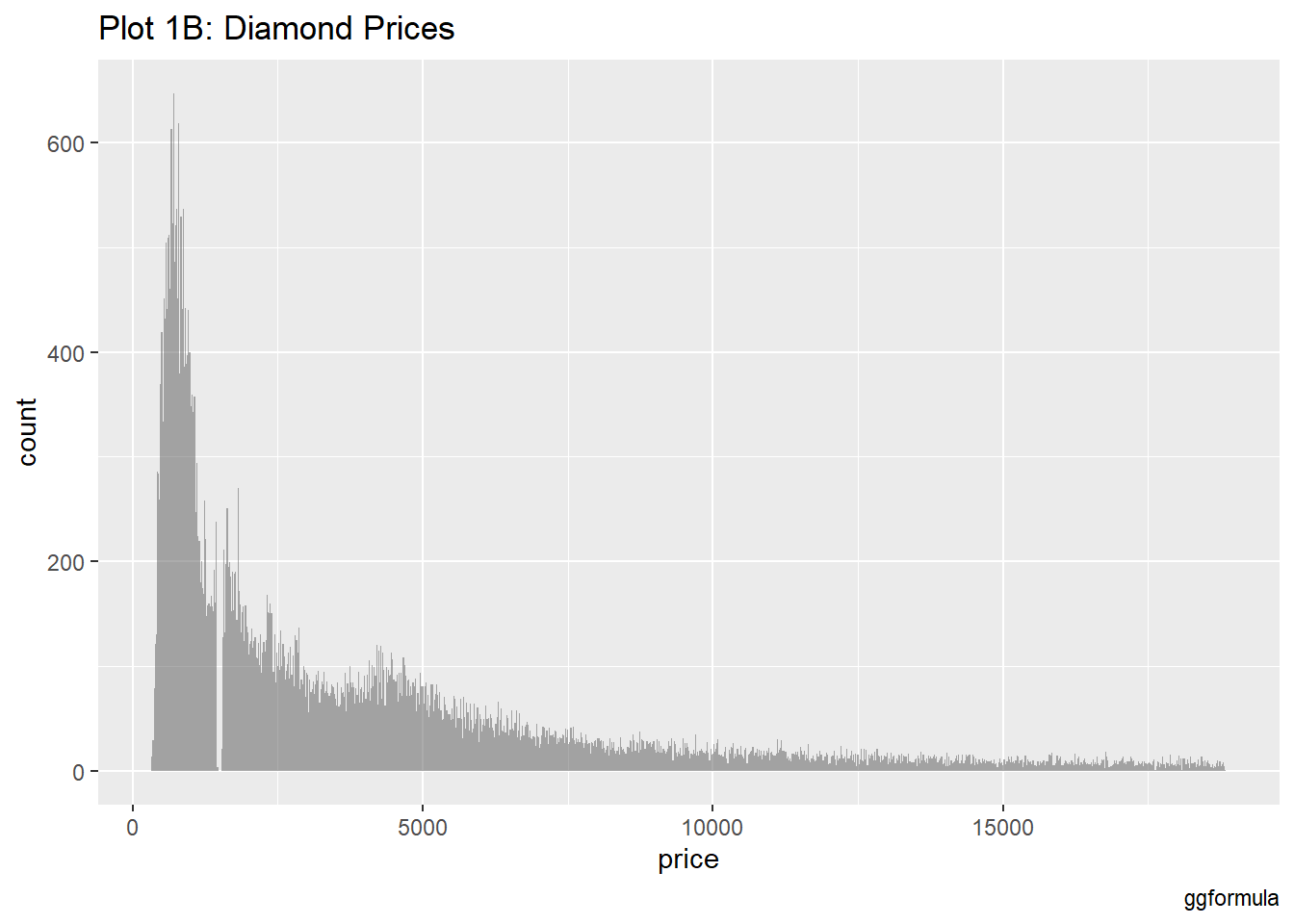
Notes: Bins in a histogram are the intervals used to group data. They help organize data points into ranges, making it easier to see how many values fall within each range. Each bin represents a specific range of values, and the height of the bar for each bin shows the number of data points in that range.

gf_histogram(~price,
  data = diamonds,
  bins = 1000
) %>%
  gf_labs(
    title = "Plot 1B: Diamond Prices",
    caption = "ggformula"
  )

Increasing the number of bins provides a more detailed view of price distribution.

Creating graphs according to carat and bins

diamonds %>%
  gf_histogram(~carat) %>%
  gf_labs(
    title = "Plot 2A: Carats of Diamonds",
    caption = "ggformula"
  )

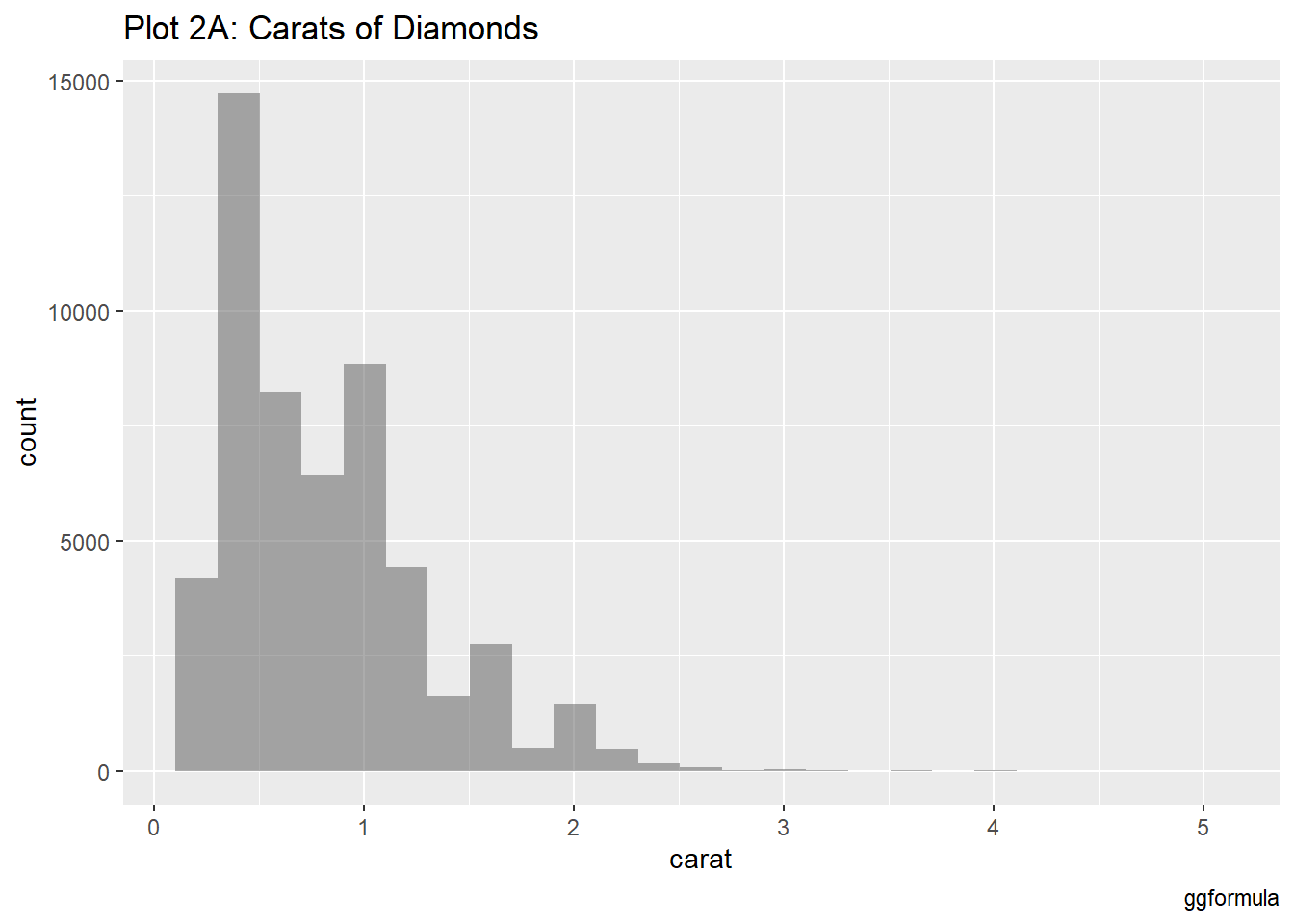
Most diamonds cluster around smaller carat sizes, with the majority falling below 1 carat. The distribution is heavily skewed, with very few diamonds exceeding 2 carats.

diamonds %>%
  gf_histogram(~carat,
    bins = 100
  ) %>%
  gf_labs(
    title = "Plot 2B: Carats of Diamonds",
    caption = "ggformula"
  )

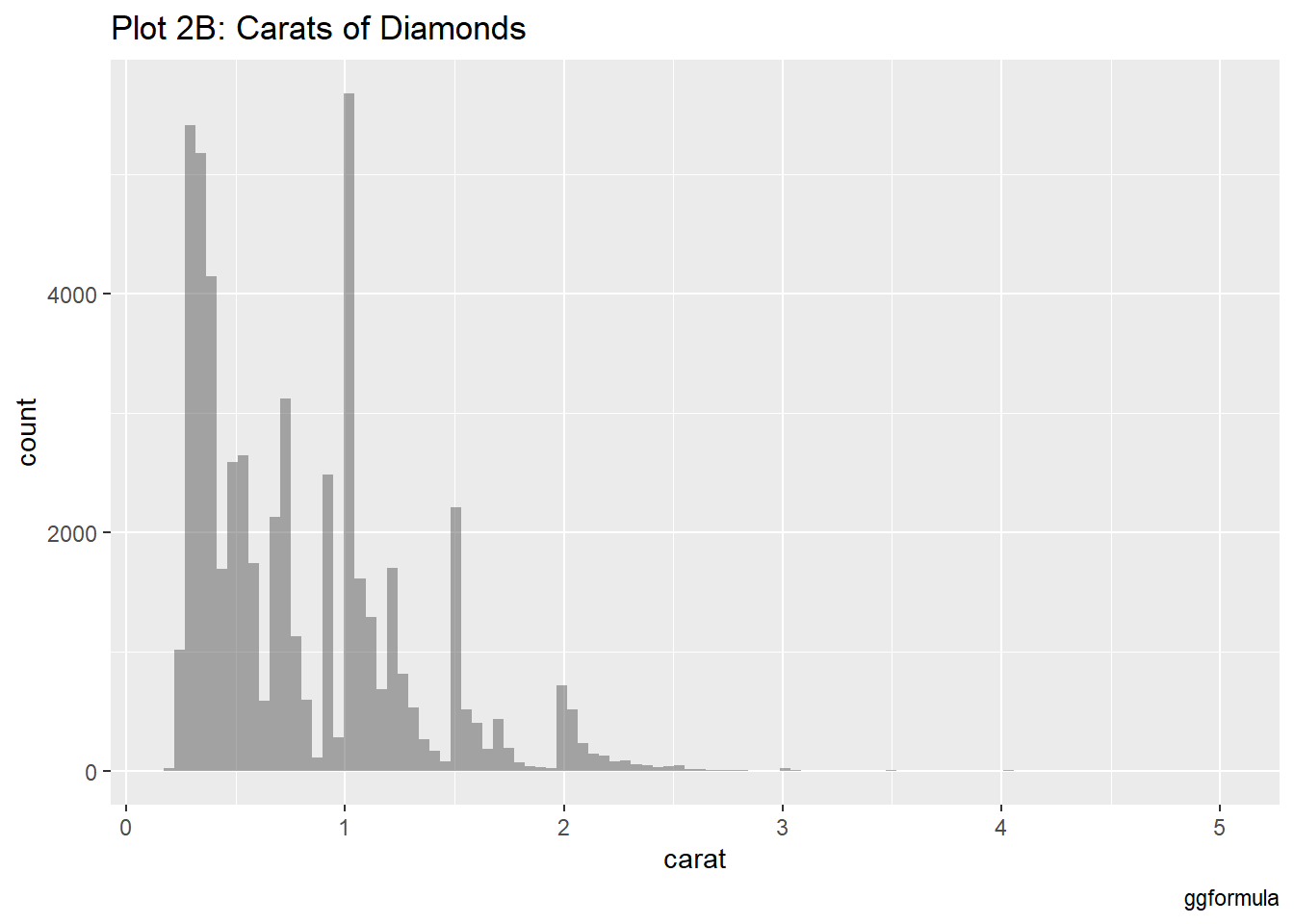
This histogram, with more bins, adds detail to the carat distribution.

Creating graphs according to price and cut

Notes: ‘alpha= some number’ refers to the transparency level of the bars. An alpha value between 0 and 1 determines how see-through the bars are.

gf_histogram(~price, fill = ~cut, data = diamonds) %>%
  gf_labs(title = "Plot 3A: Diamond Prices", caption = "ggformula")

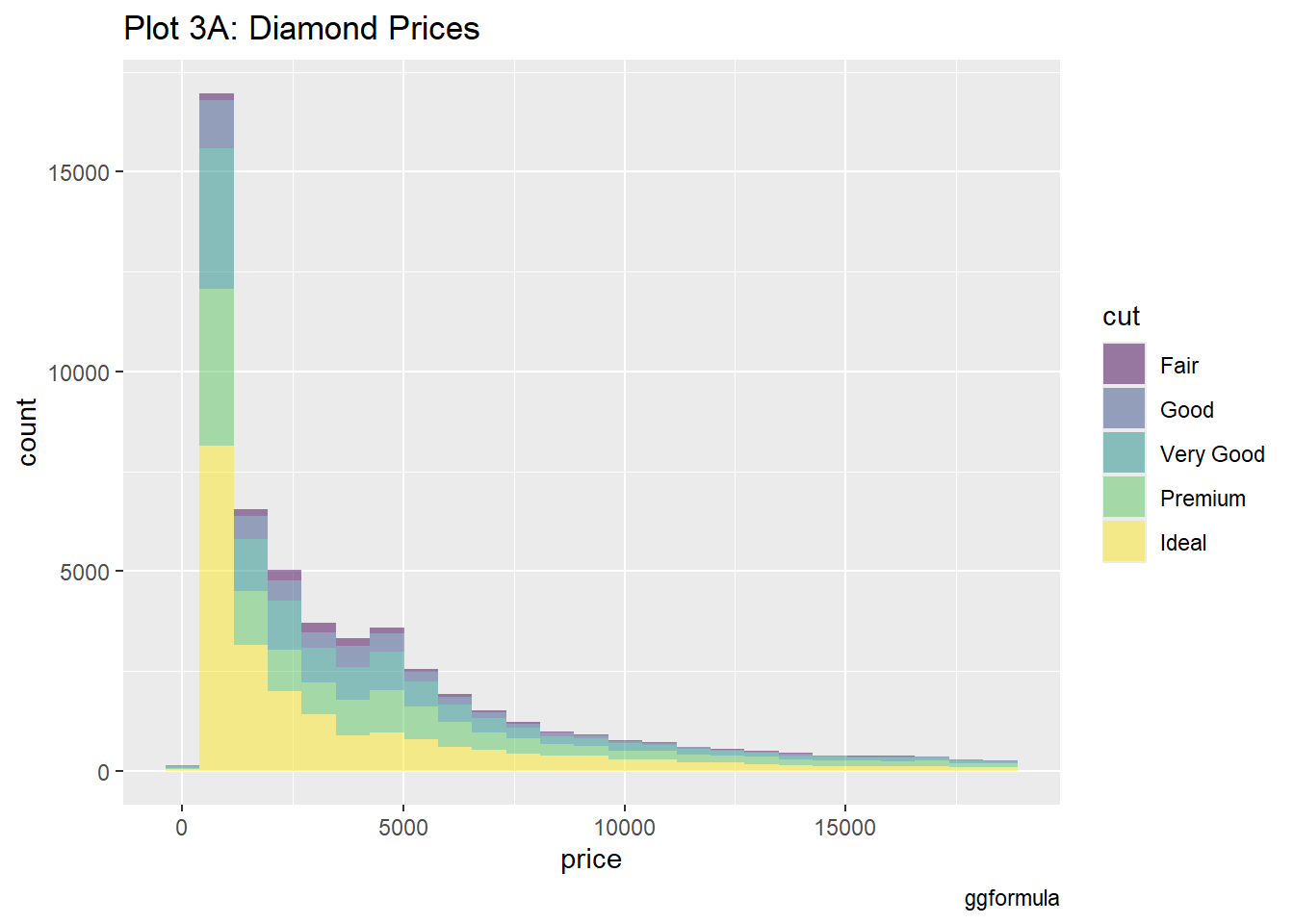
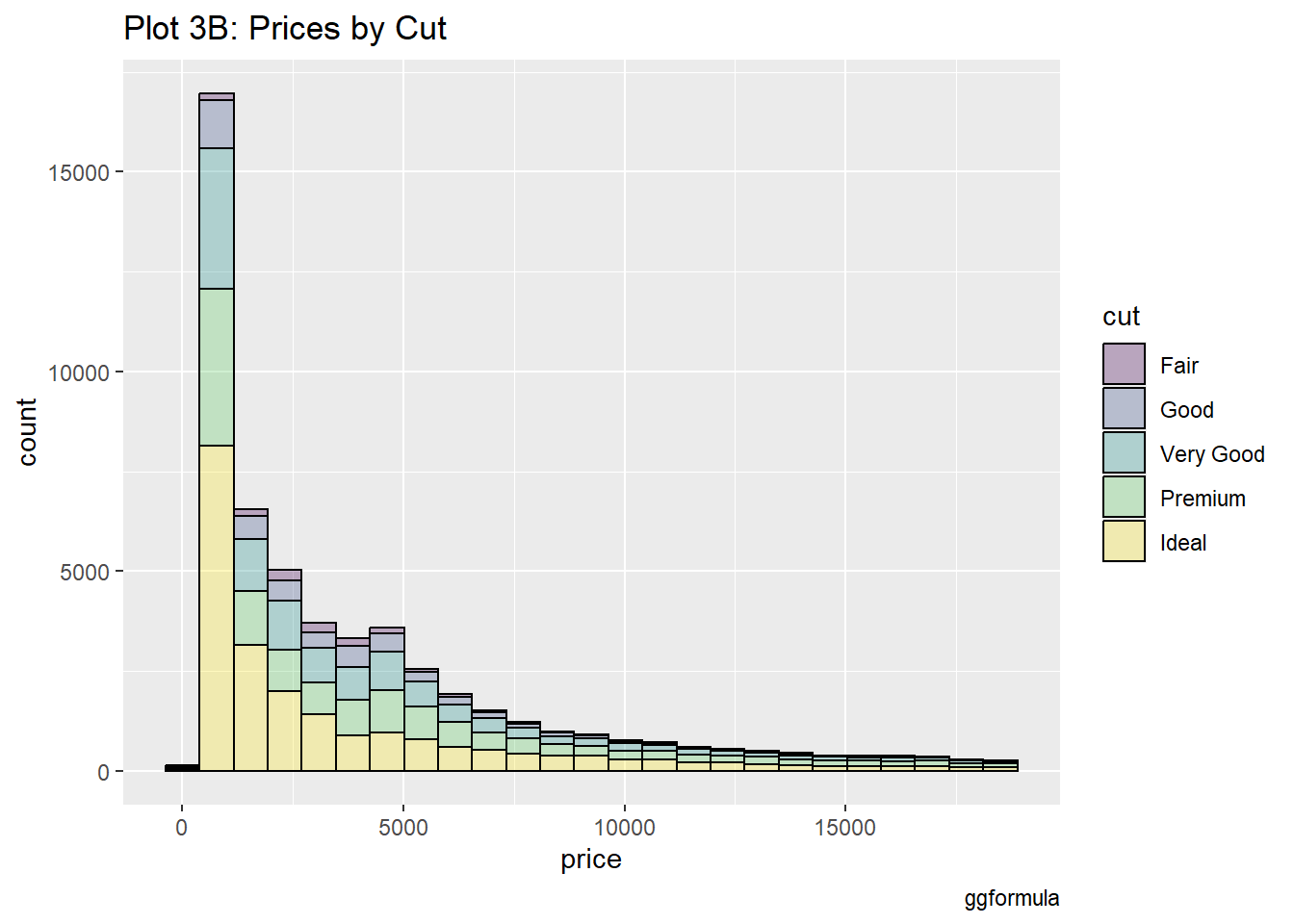
The distribution across all cuts remains right-skewed, though the distribution changes slightly based on the cut quality.

diamonds %>%
  gf_histogram(~price, fill = ~cut, color = "black", alpha = 0.3) %>%
  gf_labs(
    title = "Plot 3B: Prices by Cut",
    caption = "ggformula"
  )

Creating graphs according to price facetted by cut

diamonds %>%
  gf_histogram(~price, fill = ~cut, color = "black", alpha = 0.3) %>%
  gf_facet_wrap(~cut) %>%
  gf_labs(
    title = "Plot 3C: Prices by Filled and Facetted by Cut",
    caption = "ggformula"
  ) %>%
  gf_theme(theme(
    axis.text.x = element_text(
      angle = 45,
      hjust = 1
    )
  ))

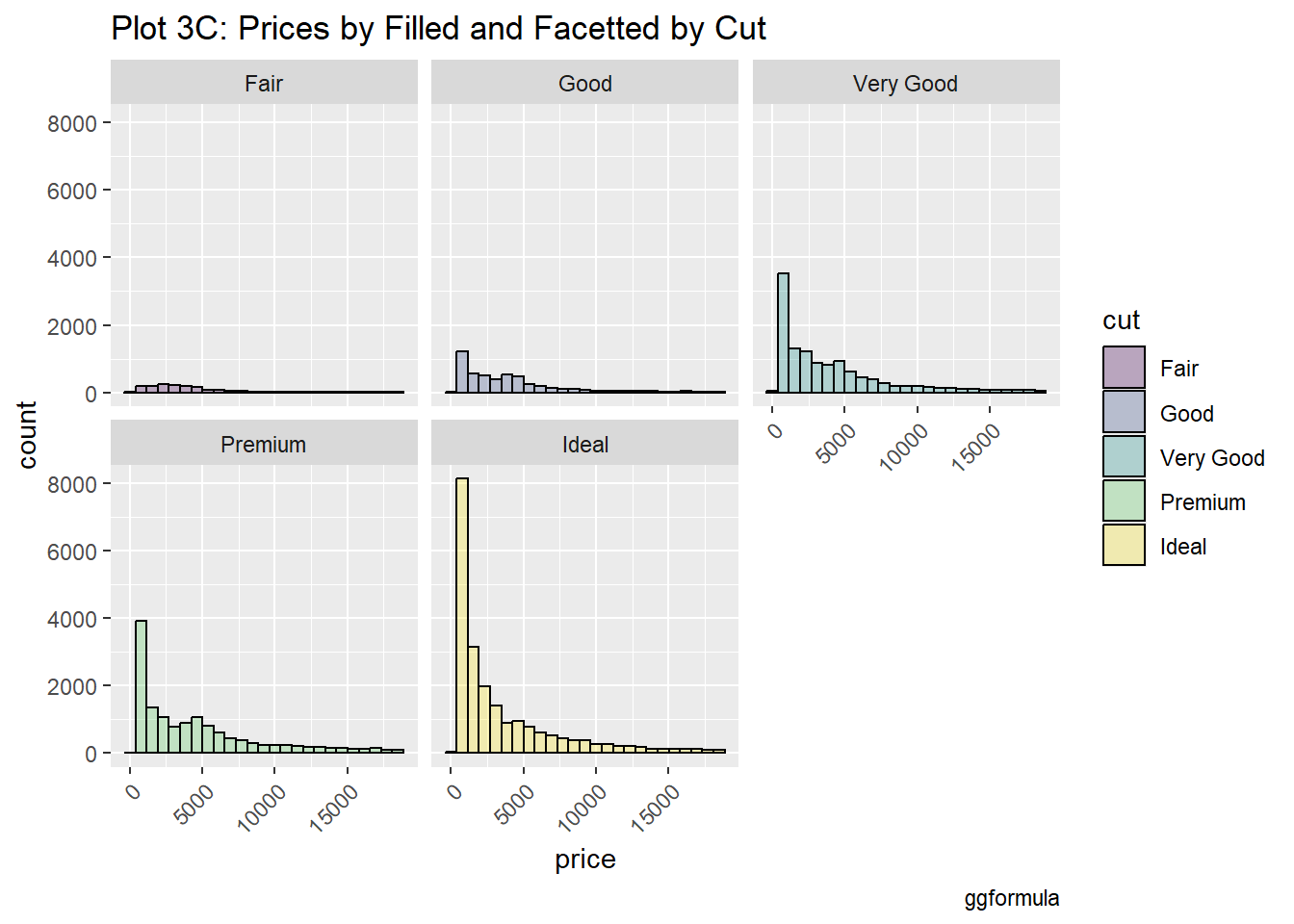
Each panel shows that even the most expensive diamonds tend to belong to the “Ideal” or “Premium” categories.

Creating graphs according to price facetted by cut with a different y-axis for each graph

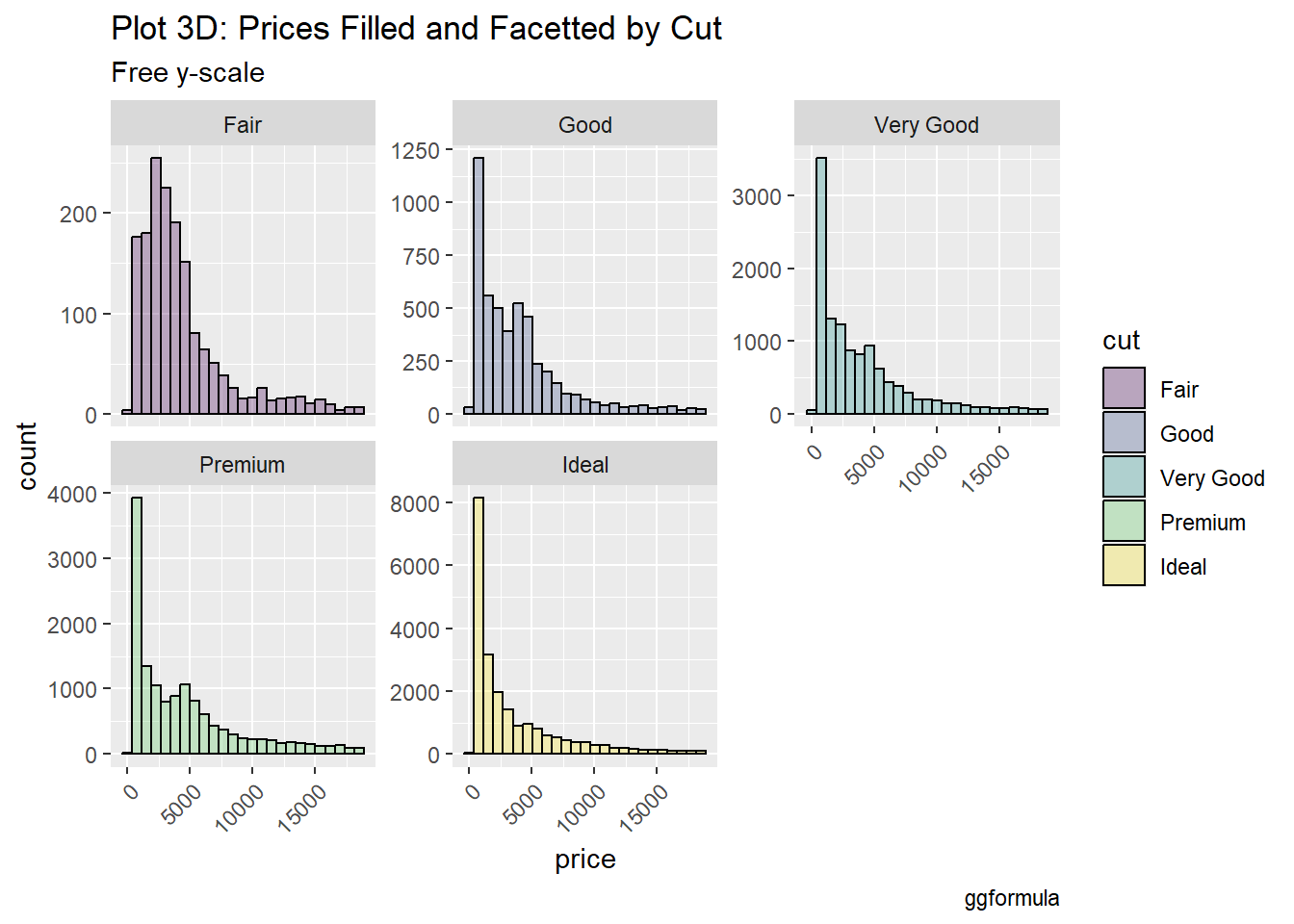
Notes: ‘free_y’ or ‘free_x’ means that the y-axis or x-axis can adjust independently for each panel in a plot, allowing for better visualization of data patterns without being constrained by a fixed scale.

diamonds %>%
  gf_histogram(~price, fill = ~cut, color = "black", alpha = 0.3) %>%
  gf_facet_wrap(~cut, scales = "free_y", nrow = 2) %>%
  gf_labs(
    title = "Plot 3D: Prices Filled and Facetted by Cut",
    subtitle = "Free y-scale",
    caption = "ggformula"
  ) %>%
  gf_theme(theme(
    axis.text.x =
      element_text(
        angle = 45,
        hjust = 1
      )
  ))

Using a free y-scale allows each panel to adjust its y-axis, which helps emphasize patterns in less common categories like Fair cut diamonds. This approach better highlights the density of price distributions across different cuts.

Creating graphs according to price and clarity

gf_histogram(~price, fill = ~clarity, data = diamonds) %>%
  gf_labs(title = "Plot 4A: Diamond Prices", caption = "ggformula")

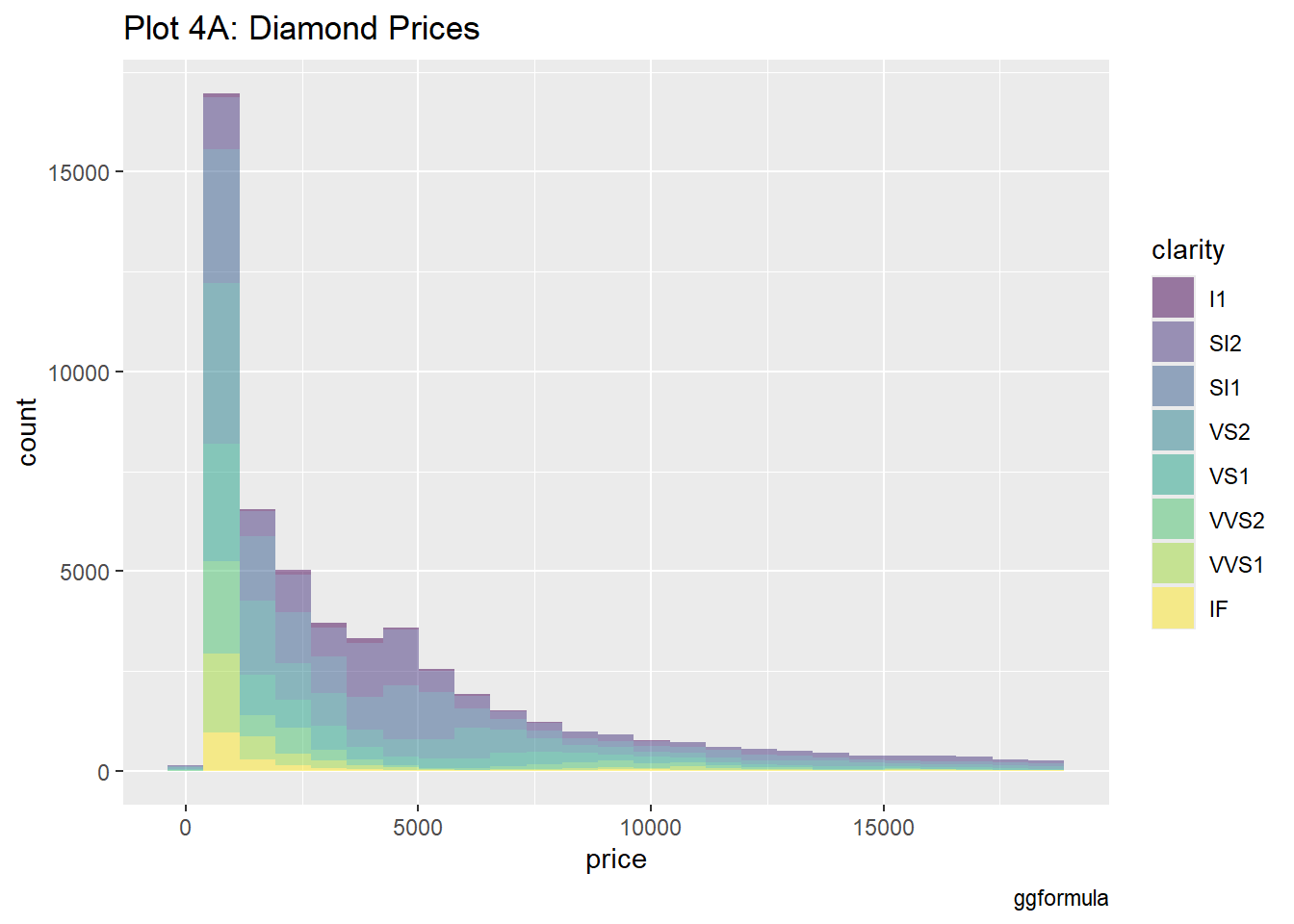
The distribution of prices by clarity shows that certain clarity levels like SI1 and VS2 dominate the lower price ranges, while IF (internally flawless) and higher clarity levels are generally priced higher.

gf_histogram(~price, fill = ~clarity, data = diamonds, color = "black", alpha = 0.7) %>%
  gf_labs(title = "Plot 4B: Prices by Clarity", caption = "ggformula")

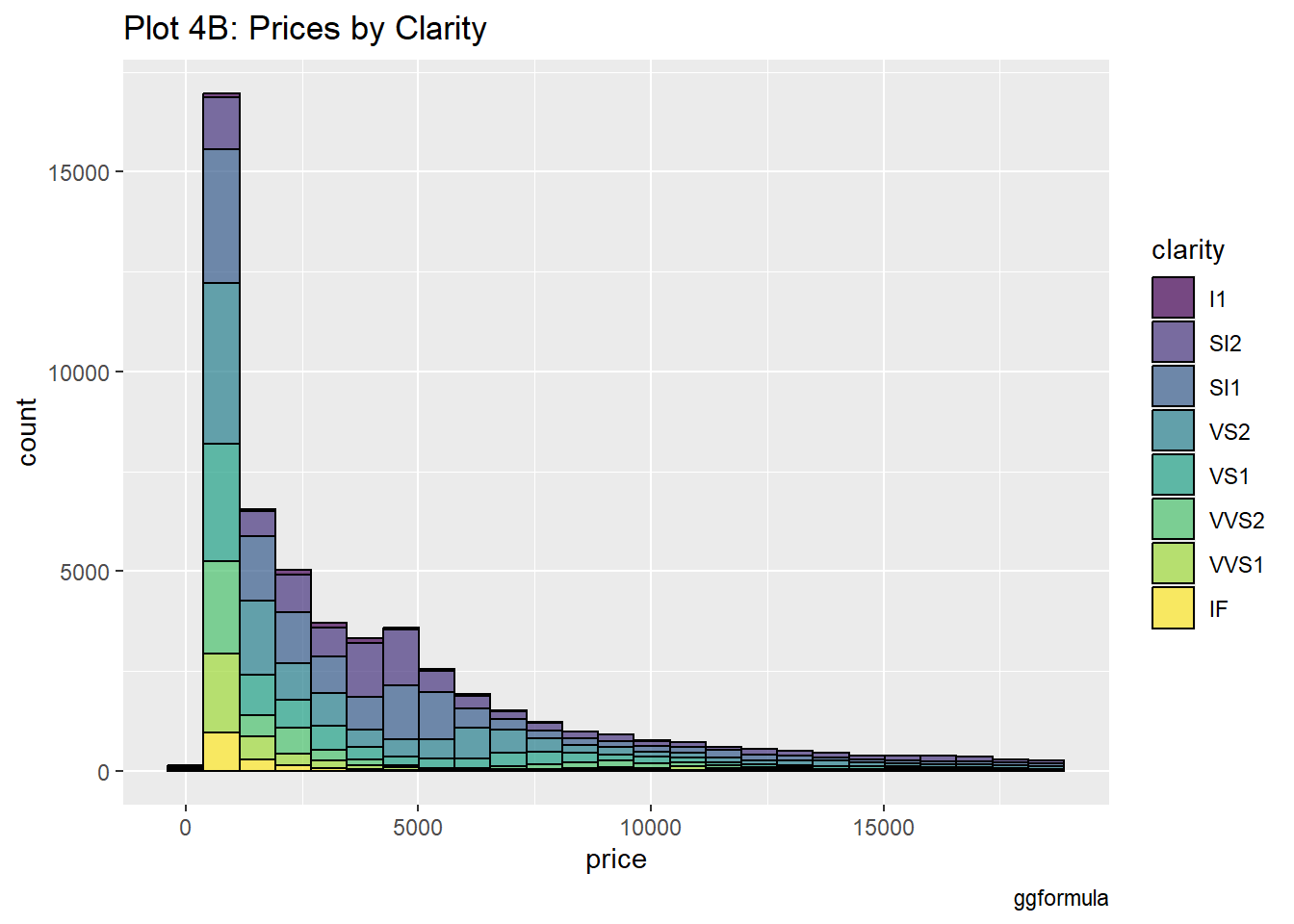
By facetting the data by clarity, it’s easier to see the price distribution within each clarity level.

Creating graphs according to price facetted by clarity

  gf_histogram(~price, fill = ~clarity, data = diamonds, color="black", alpha =0.7) %>%
gf_facet_wrap(~clarity) %>%
  gf_labs(
    title = "Plot 4C: Prices by Filled and Facetted by Clarity",
    caption = "ggformula"
  ) 

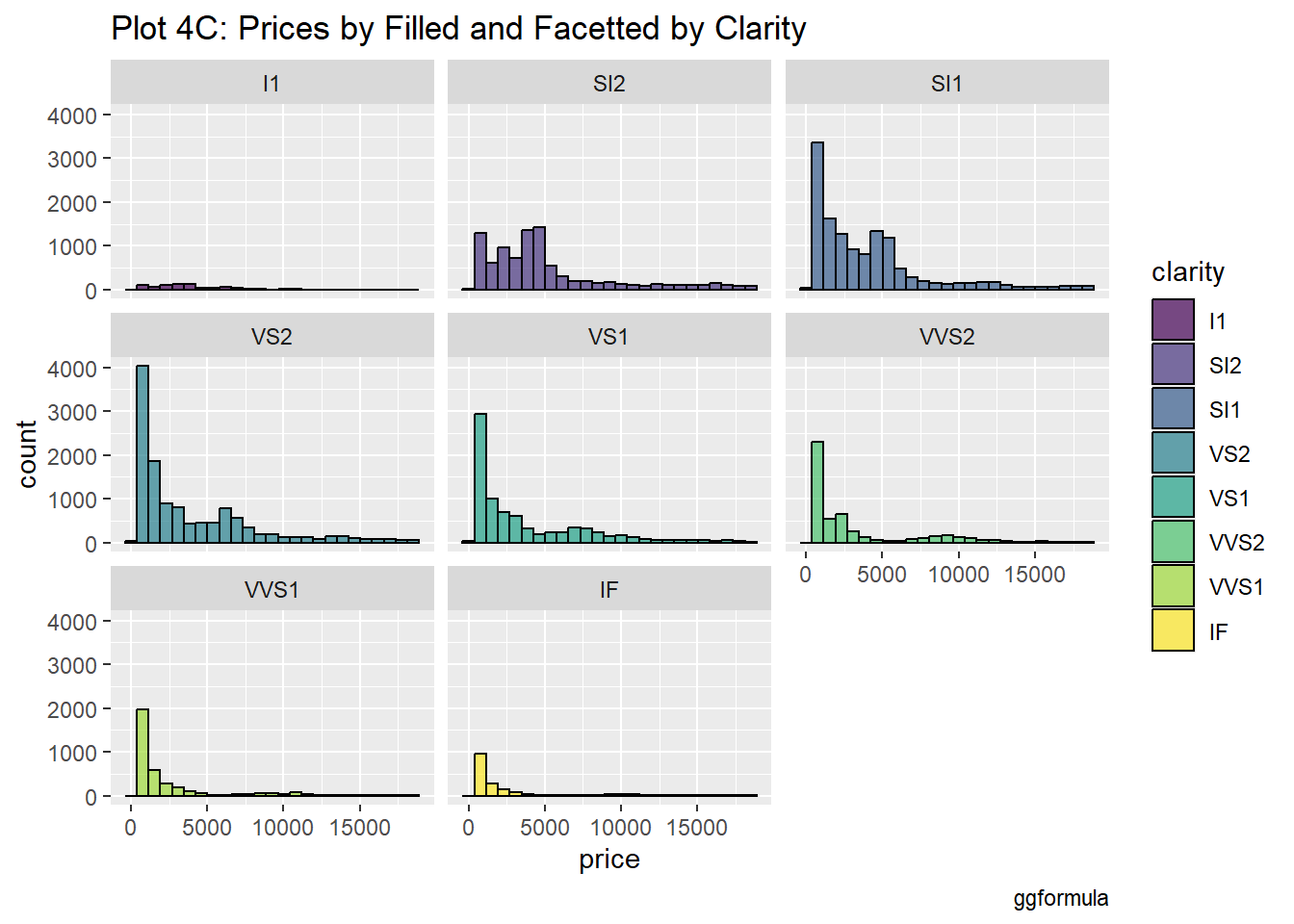
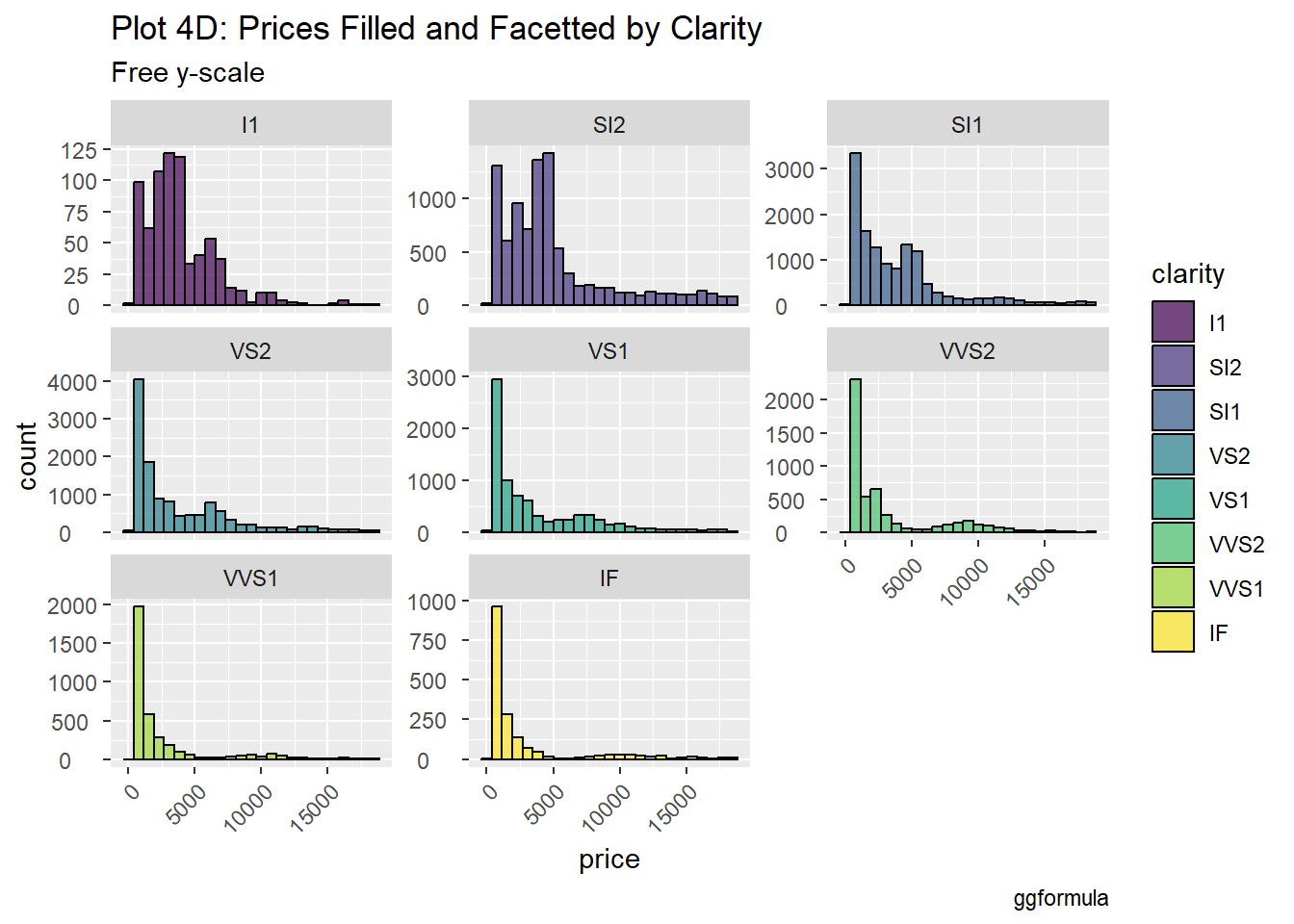
Each clarity group reveals different price distributions, indicating how clarity affects the overall value of diamonds. Clarity grades like IF might show higher price concentrations, while lower clarity grades may display wider ranges or lower price peaks.

Creating graphs according to price facetted by clarity with a different y-axis for each graph

  gf_histogram(~price, fill = ~clarity, data = diamonds, color ="black", alpha=0.7) %>%gf_facet_wrap(~clarity, scales = "free_y", nrow = 3) %>%
  gf_labs(
    title = "Plot 4D: Prices Filled and Facetted by Clarity",
    subtitle = "Free y-scale",
    caption = "ggformula"
  ) %>%
  gf_theme(theme(
    axis.text.x =
      element_text(
        angle = 45,
        hjust = 1
      )
  )) %>% 
    gf_theme(theme(
    axis.text.y =
      element_text(
        hjust = 0.3
      )
  ))

Similar to Plot 4C, but with free y-scales for each clarity category. This setup provides a clearer view of price distributions, especially in groups with very different price ranges. The varying scales show that some clarity categories, like VS1 and VS2, can have significant price variation compared to others.

Creating graphs according to price and colour

diamonds %>%
  gf_histogram(~price, fill = ~color) %>%
  gf_labs(
    title = "Plot 5A: Diamond Prices",
    caption = "ggformula"
  )

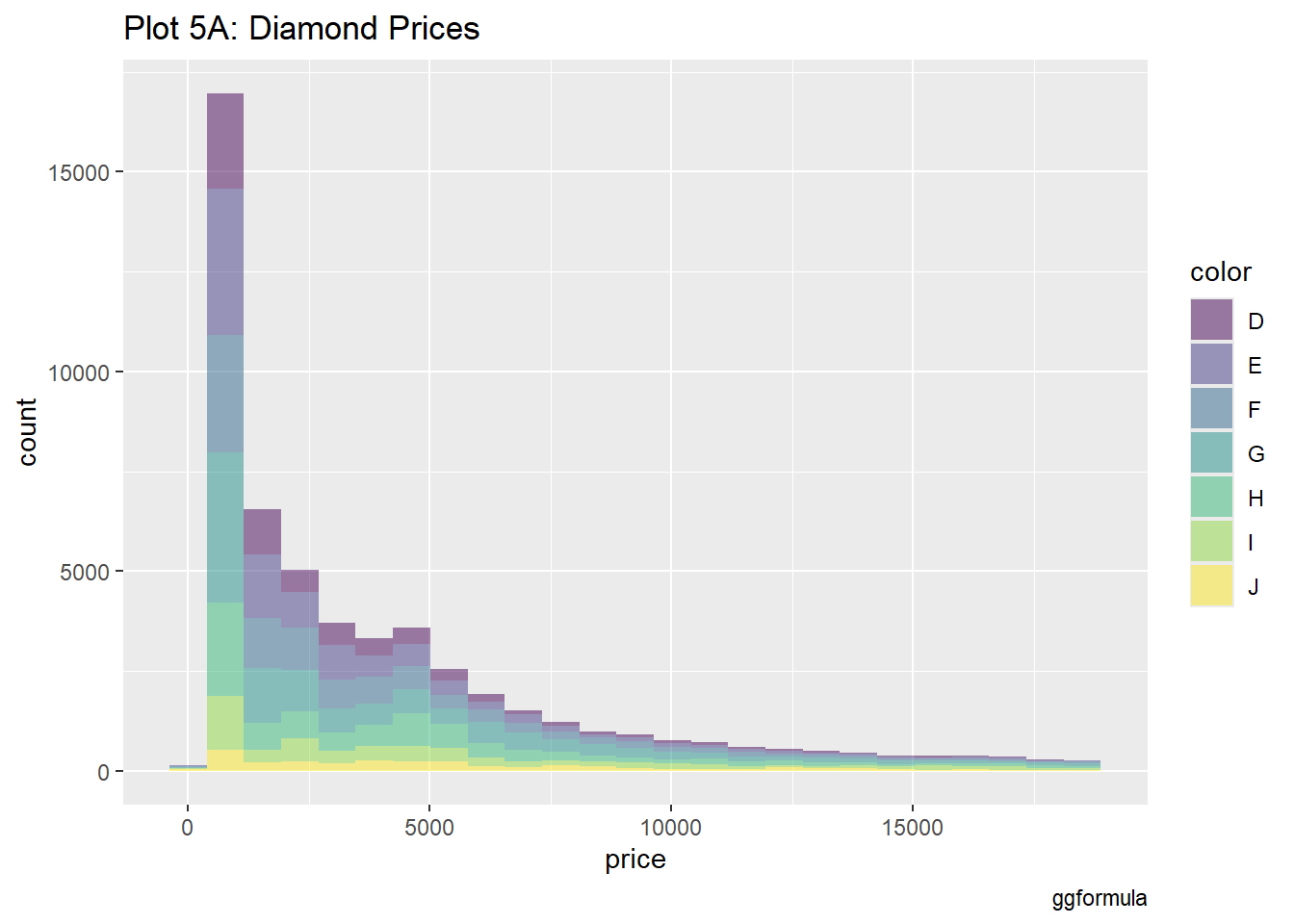
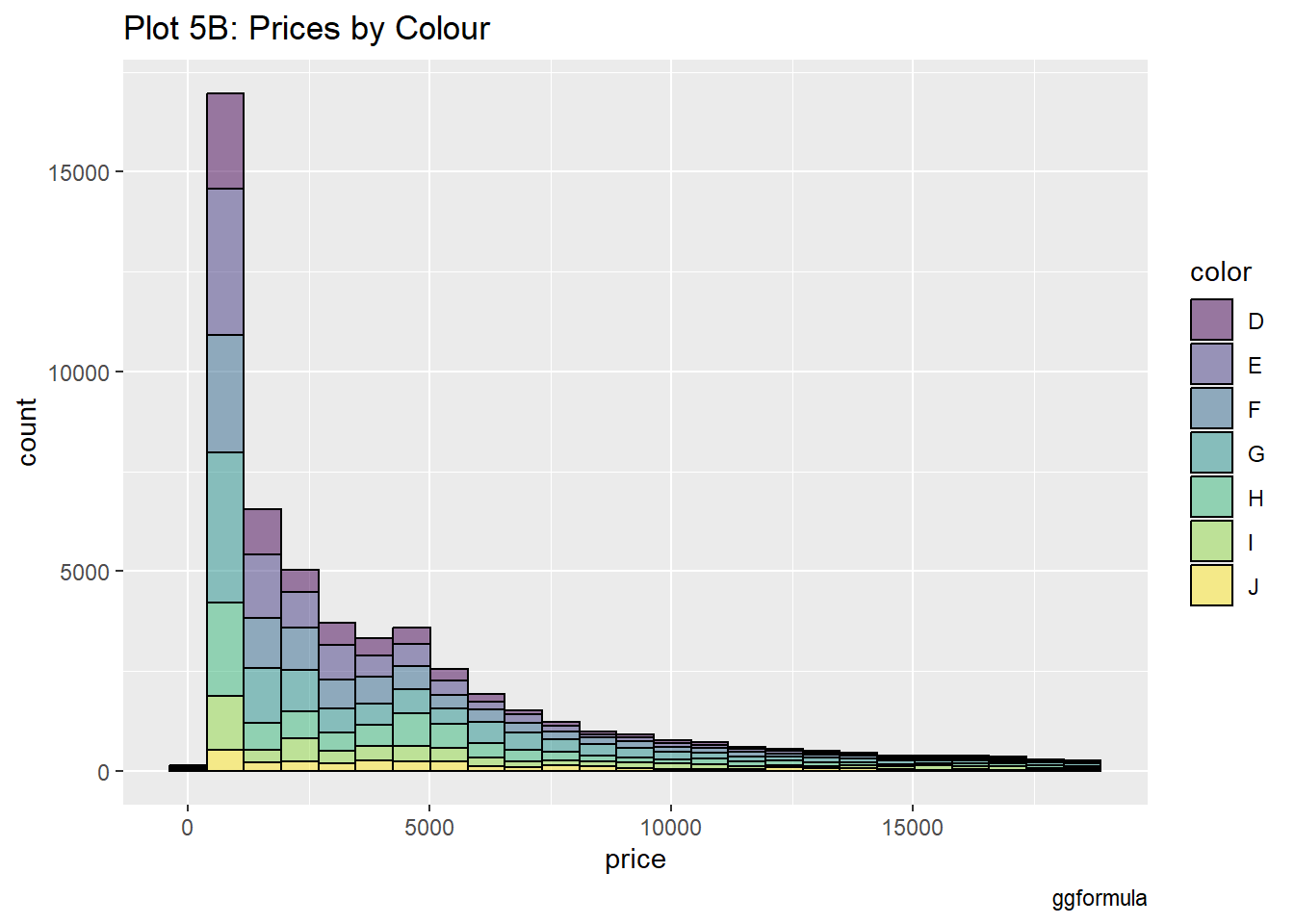
The visualization shows how color influences diamond prices, with some colors likely commanding higher prices. Color categories such as D (colorless) generally yield higher price ranges than J (faint yellow).

diamonds %>%
  gf_histogram(~price, fill = ~color, color = "black", alpha = 0.5) %>%
  gf_labs(
    title = "Plot 5B: Prices by Colour",
    caption = "ggformula"
  )

Creating graphs according to price facetted by colour

diamonds %>%
  gf_histogram(~price, fill = ~color, color = "black", alpha = 0.5) %>%
gf_facet_wrap(~color) %>%
  gf_labs(
    title = "Plot 5C: Prices by Filled and Facetted by Colour",
    caption = "ggformula"
  )

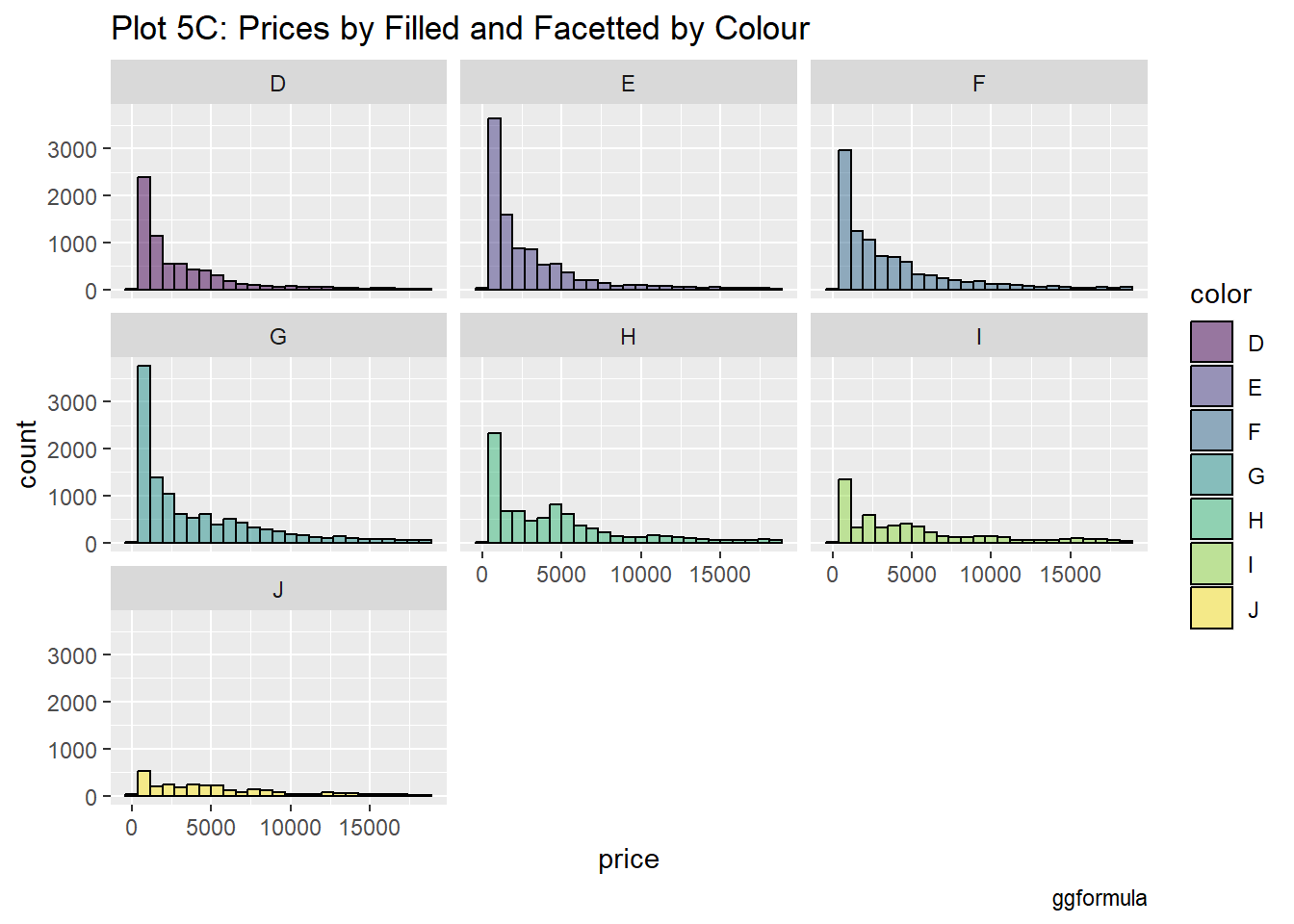
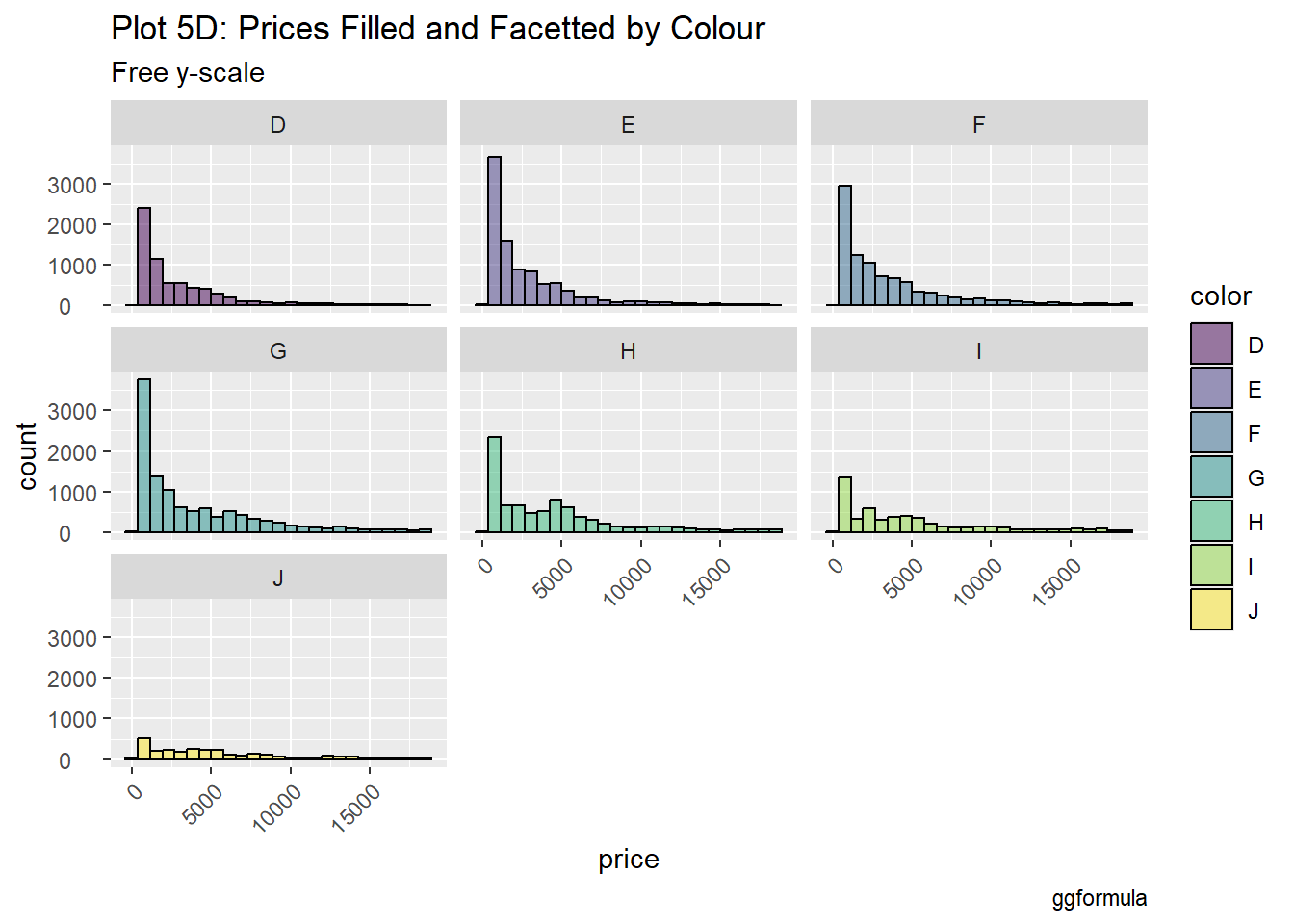
Each facet represents a color category, providing a clear comparison of how each color affects pricing. Some colors may show very distinct distributions, with the colors like D and E exhibiting higher concentration in the upper price ranges.

Creating graphs according to price facetted by colour with a different y-axis for each graph

diamonds %>%
  gf_histogram(~price, fill = ~color, color = "black", alpha = 0.5) %>%
gf_facet_wrap(~color) %>%
  gf_labs(
    title = "Plot 5D: Prices Filled and Facetted by Colour",
    subtitle = "Free y-scale",
    caption = "ggformula"
  ) %>%
  gf_theme(theme(
    axis.text.x =
      element_text(
        angle = 45,
        hjust = 1
      )
  )) %>% 
    gf_theme(theme(
    axis.text.y =
      element_text(
        hjust = 0.3
      )
  ))

Datasets: Race(details of various races) & Rank (the participants of the races)

race_df <- read_csv("https://raw.githubusercontent.com/rfordatascience/tidytuesday/master/data/2021/2021-10-26/race.csv")
Rows: 1207 Columns: 13
── Column specification ────────────────────────────────────────────────────────
Delimiter: ","
chr  (5): event, race, city, country, participation
dbl  (6): race_year_id, distance, elevation_gain, elevation_loss, aid_statio...
date (1): date
time (1): start_time

ℹ Use `spec()` to retrieve the full column specification for this data.
ℹ Specify the column types or set `show_col_types = FALSE` to quiet this message.
rank_df <- read_csv("https://raw.githubusercontent.com/rfordatascience/tidytuesday/master/data/2021/2021-10-26/ultra_rankings.csv")
Rows: 137803 Columns: 8
── Column specification ────────────────────────────────────────────────────────
Delimiter: ","
chr (4): runner, time, gender, nationality
dbl (4): race_year_id, rank, age, time_in_seconds

ℹ Use `spec()` to retrieve the full column specification for this data.
ℹ Specify the column types or set `show_col_types = FALSE` to quiet this message.

Organizing the data

glimpse(race_df)
Rows: 1,207
Columns: 13
$ race_year_id   <dbl> 68140, 72496, 69855, 67856, 70469, 66887, 67851, 68241,…
$ event          <chr> "Peak District Ultras", "UTMB®", "Grand Raid des Pyréné…
$ race           <chr> "Millstone 100", "UTMB®", "Ultra Tour 160", "PERSENK UL…
$ city           <chr> "Castleton", "Chamonix", "vielle-Aure", "Asenovgrad", "…
$ country        <chr> "United Kingdom", "France", "France", "Bulgaria", "Turk…
$ date           <date> 2021-09-03, 2021-08-27, 2021-08-20, 2021-08-20, 2021-0…
$ start_time     <time> 19:00:00, 17:00:00, 05:00:00, 18:00:00, 18:00:00, 17:0…
$ participation  <chr> "solo", "Solo", "solo", "solo", "solo", "solo", "solo",…
$ distance       <dbl> 166.9, 170.7, 167.0, 164.0, 159.9, 159.9, 163.8, 163.9,…
$ elevation_gain <dbl> 4520, 9930, 9980, 7490, 100, 9850, 5460, 4630, 6410, 31…
$ elevation_loss <dbl> -4520, -9930, -9980, -7500, -100, -9850, -5460, -4660, …
$ aid_stations   <dbl> 10, 11, 13, 13, 12, 15, 5, 8, 13, 23, 13, 5, 12, 15, 0,…
$ participants   <dbl> 150, 2300, 600, 150, 0, 300, 0, 200, 120, 100, 300, 50,…
glimpse(rank_df)
Rows: 137,803
Columns: 8
$ race_year_id    <dbl> 68140, 68140, 68140, 68140, 68140, 68140, 68140, 68140…
$ rank            <dbl> 1, 2, 3, 4, 5, 6, 7, 8, 9, 10, 11, 12, 13, NA, NA, NA,…
$ runner          <chr> "VERHEUL Jasper", "MOULDING JON", "RICHARDSON Phill", …
$ time            <chr> "26H 35M 25S", "27H 0M 29S", "28H 49M 7S", "30H 53M 37…
$ age             <dbl> 30, 43, 38, 55, 48, 31, 55, 40, 47, 29, 48, 47, 52, 49…
$ gender          <chr> "M", "M", "M", "W", "W", "M", "W", "W", "M", "M", "M",…
$ nationality     <chr> "GBR", "GBR", "GBR", "GBR", "GBR", "GBR", "GBR", "GBR"…
$ time_in_seconds <dbl> 95725, 97229, 103747, 111217, 117981, 118000, 120601, …

Summary Statistics for Distance in Race Data

race_df %>%
  favstats(~distance, data = .)
 min    Q1 median     Q3   max     mean       sd    n missing
   0 160.1  161.5 165.15 179.1 152.6187 39.87864 1207       0

Summary Statistics for Number of Participants in Race Data

race_df %>%
  favstats(~participants, data = .)
 min Q1 median  Q3  max     mean       sd    n missing
   0  0     21 150 2900 120.4872 281.8337 1207       0

Summary Statistics for Race Time by Gender

rank_df %>%
  drop_na() %>%
  favstats(time_in_seconds ~ gender, data = .)
  gender  min      Q1 median       Q3    max     mean       sd      n missing
1      M 3600 96536.5 115845 149761.5 288000 123271.1 37615.42 101643       0
2      W 9191 96695.0 107062 131464.0 296806 117296.5 34604.26  18341       0

Cross-table of Race Time and Age by Gender

crosstable(time_in_seconds + age ~ gender, data = rank_df) %>%
  crosstable::as_flextable()

label

variable

gender

M

W

NA

time_in_seconds

Min / Max

3600.0 / 2.9e+05

9191.0 / 3.0e+05

8131.0 / 2.2e+05

Med [IQR]

1.2e+05 [9.7e+04;1.5e+05]

1.1e+05 [9.7e+04;1.3e+05]

1.2e+05 [9.9e+04;1.5e+05]

Mean (std)

1.2e+05 (3.8e+04)

1.2e+05 (3.5e+04)

1.2e+05 (4.4e+04)

N (NA)

101643 (15073)

18341 (2716)

28 (2)

age

Min / Max

0 / 133.0

0 / 81.0

29.0 / 59.0

Med [IQR]

47.0 [40.0;53.0]

45.0 [39.0;52.0]

40.5 [36.0;50.5]

Mean (std)

46.4 (10.2)

45.3 (9.7)

41.7 (9.0)

N (NA)

116716 (0)

21057 (0)

30 (0)

Number of races held by various countries

race_df %>%
  count(country) %>%
  arrange(desc(n))
# A tibble: 61 × 2
   country            n
   <chr>          <int>
 1 United States    438
 2 United Kingdom   110
 3 France            56
 4 Australia         46
 5 Sweden            46
 6 China             45
 7 Canada            32
 8 Spain             27
 9 Japan             24
10 Poland            23
# ℹ 51 more rows

Number of races held by different nationalities

rank_df %>%
  count(nationality) %>%
  arrange(desc(n))
# A tibble: 133 × 2
   nationality     n
   <chr>       <int>
 1 USA         47259
 2 FRA         28905
 3 GBR         11076
 4 JPN          6729
 5 ESP          5478
 6 CHN          4744
 7 CAN          2822
 8 ITA          2794
 9 SWE          2293
10 AUS          1683
# ℹ 123 more rows

Countries have the maximum number of winners

rank_df %>%
  filter(rank %in% c(1, 2, 3)) %>%
  count(nationality) %>%
  arrange(desc(n))
# A tibble: 69 × 2
   nationality     n
   <chr>       <int>
 1 USA          1240
 2 GBR           347
 3 FRA           210
 4 AUS           140
 5 CAN           132
 6 CHN           128
 7 SWE           124
 8 ESP           113
 9 JPN            94
10 ITA            79
# ℹ 59 more rows

Countries have had the most top-3 finishes in the longest distance race

longest_races <- race_df %>%
  slice_max(n = 5, order_by = distance) # Longest distance races
longest_races
# A tibble: 6 × 13
  race_year_id event     race  city  country date       start_time participation
         <dbl> <chr>     <chr> <chr> <chr>   <date>     <time>     <chr>        
1        68776 Ultra To… Ut4M… Gren… France  2021-07-16 18:00      Solo         
2        55551 Ultra Tr… Inth… Chom… Thaila… 2020-02-14 10:00      solo         
3         7484 Le TREG®… LE T… Fada  Chad    2015-02-06 00:00      solo         
4         7594 THE GREA… 100 … Pato… Austra… 2014-09-13 00:00      Solo         
5        71066 ULTRA 01  Ultr… Oyon… France  2021-07-09 18:00      solo         
6        23565 EstrelAç… Estr… Penh… Portug… 2017-10-06 18:00      Solo         
# ℹ 5 more variables: distance <dbl>, elevation_gain <dbl>,
#   elevation_loss <dbl>, aid_stations <dbl>, participants <dbl>
longest_races %>%
  left_join(., rank_df, by = "race_year_id") %>% # total participants in longest 4 races
  filter(rank %in% c(1:10)) %>% # Top 10 ranks
  count(nationality) %>%
  arrange(desc(n))
# A tibble: 9 × 2
  nationality     n
  <chr>       <int>
1 FRA            26
2 AUS             9
3 POR             8
4 THA             8
5 BEL             1
6 BRA             1
7 ESP             1
8 MAS             1
9 RUS             1

Distribution of time across both races and ranks

rank_df %>%
  gf_histogram(~time_in_seconds, bins = 75) %>%
  gf_labs(title = "Histogram of Race Times")
Warning: Removed 17791 rows containing non-finite outside the scale range
(`stat_bin()`).

Race distances

race_df %>%
  gf_histogram(~distance, bins = 50) %>%
  gf_labs(title = "Histogram of Race Distances")

Enteries where distance is zero

race_df %>%
  filter(distance == 0)
# A tibble: 74 × 13
   race_year_id event    race  city  country date       start_time participation
          <dbl> <chr>    <chr> <chr> <chr>   <date>     <time>     <chr>        
 1        64771 The Old… 100m… Hanm… New Ze… 2021-05-14 10:00      solo         
 2        71220 Run Lov… 100M  <NA>  United… 2021-02-26 00:00      solo         
 3        67160 IDAHO M… 100 … <NA>  United… 2020-09-12 00:00      solo         
 4        67713 Pine cr… 100M… Well… PA, Un… 2020-09-12 00:00      solo         
 5        51777 Chiemga… 100 … Berg… Germany 2020-07-31 13:00      Solo         
 6        66413 Palisad… Moos… Irwin United… 2020-07-17 05:00      solo         
 7        62593 Run Lov… 100M  <NA>  United… 2020-02-28 00:00      solo         
 8        50097 The Gre… The … Hanm… New Ze… 2020-01-17 07:00      solo         
 9        65861 Loup Ga… 100M  Vill… LA, Un… 2019-12-14 00:00      solo         
10        59415 RIO DEL… 100 … <NA>  United… 2019-11-07 00:00      solo         
# ℹ 64 more rows
# ℹ 5 more variables: distance <dbl>, elevation_gain <dbl>,
#   elevation_loss <dbl>, aid_stations <dbl>, participants <dbl>

Distribution of finishing times for race distance around 150

Count for starting times of race

race_times <- race_df %>%
  count(start_time) %>%
  arrange(desc(n))
race_times
# A tibble: 39 × 2
   start_time     n
   <time>     <int>
 1 00:00        513
 2 06:00        114
 3 08:00         63
 4 10:00         60
 5 07:00         58
 6 18:00         50
 7 05:00         48
 8 12:00         38
 9 04:00         30
10 09:00         27
# ℹ 29 more rows

Convert start_time into a factor with levels: early_morning(0200:0600), late_morning(0600:1000), midday(1000:1400), afternoon(1400: 1800), evening(1800:2200), and night(2200:0200)

Notes:

‘left_join’ combines two datasets by matching rows based on a common key, preserving all records from the left dataset.

‘vars’ is used in functions to specify variable names for grouping or facetting in data visualizations.

race_start_factor <- race_df %>%
  filter(distance == 0) %>% # Races that actually took place
  mutate(
    start_day_time =
      case_when(
        start_time > hms("02:00:00") &
          start_time <= hms("06:00:00") ~ "early_morning",
        start_time > hms("06:00:01") &
          start_time <= hms("10:00:00") ~ "late_morning",
        start_time > hms("10:00:01") &
          start_time <= hms("14:00:00") ~ "mid_day",
        start_time > hms("14:00:01") &
          start_time <= hms("18:00:00") ~ "afternoon",
        start_time > hms("18:00:01") &
          start_time <= hms("22:00:00") ~ "evening",
        start_time > hms("22:00:01") &
          start_time <= hms("23:59:59") ~ "night",
        start_time >= hms("00:00:00") &
          start_time <= hms("02:00:00") ~ "postmidnight",
        .default = "other"
      )
  ) %>%
  mutate(
    start_day_time =
      as_factor(start_day_time) %>%
        fct_collapse(
          .f = .,
          night = c("night", "postmidnight")
        )
  )
Warning: There was 1 warning in `mutate()`.
ℹ In argument: `start_day_time = `%>%`(...)`.
Caused by warning:
! Unknown levels in `f`: night
##
# Join with rank_df
race_start_factor %>%
  left_join(rank_df, by = "race_year_id") %>%
  drop_na(time_in_seconds) %>%
  gf_histogram(
    ~time_in_seconds,
    bins = 75,
    fill = ~start_day_time,
    color = ~start_day_time,
    alpha = 0.5
  ) %>%
  gf_facet_wrap(vars(start_day_time), ncol = 2, scales = "free_y") %>%
  gf_labs(title = "Race Times by Start-Time")

Population dataset

pop <- read_delim("../../data/populations.csv")
Rows: 16400 Columns: 4
── Column specification ────────────────────────────────────────────────────────
Delimiter: ","
chr (2): country_code, country_name
dbl (2): year, value

ℹ Use `spec()` to retrieve the full column specification for this data.
ℹ Specify the column types or set `show_col_types = FALSE` to quiet this message.
pop
# A tibble: 16,400 × 4
   country_code country_name  year value
   <chr>        <chr>        <dbl> <dbl>
 1 ABW          Aruba         1960 54608
 2 ABW          Aruba         1961 55811
 3 ABW          Aruba         1962 56682
 4 ABW          Aruba         1963 57475
 5 ABW          Aruba         1964 58178
 6 ABW          Aruba         1965 58782
 7 ABW          Aruba         1966 59291
 8 ABW          Aruba         1967 59522
 9 ABW          Aruba         1968 59471
10 ABW          Aruba         1969 59330
# ℹ 16,390 more rows

Organizing data

inspect(pop)

categorical variables:  
          name     class levels     n missing
1 country_code character    265 16400       0
2 country_name character    265 16400       0
                                   distribution
1 ABW (0.4%), AFE (0.4%), AFG (0.4%) ...       
2 Afghanistan (0.4%) ...                       

quantitative variables:  
   name   class  min       Q1  median       Q3        max         mean
1  year numeric 1960   1975.0    1991     2006       2021 1.990529e+03
2 value numeric 2646 986302.5 6731400 46024452 7888408686 2.140804e+08
            sd     n missing
1 1.789551e+01 16400       0
2 7.040554e+08 16400       0

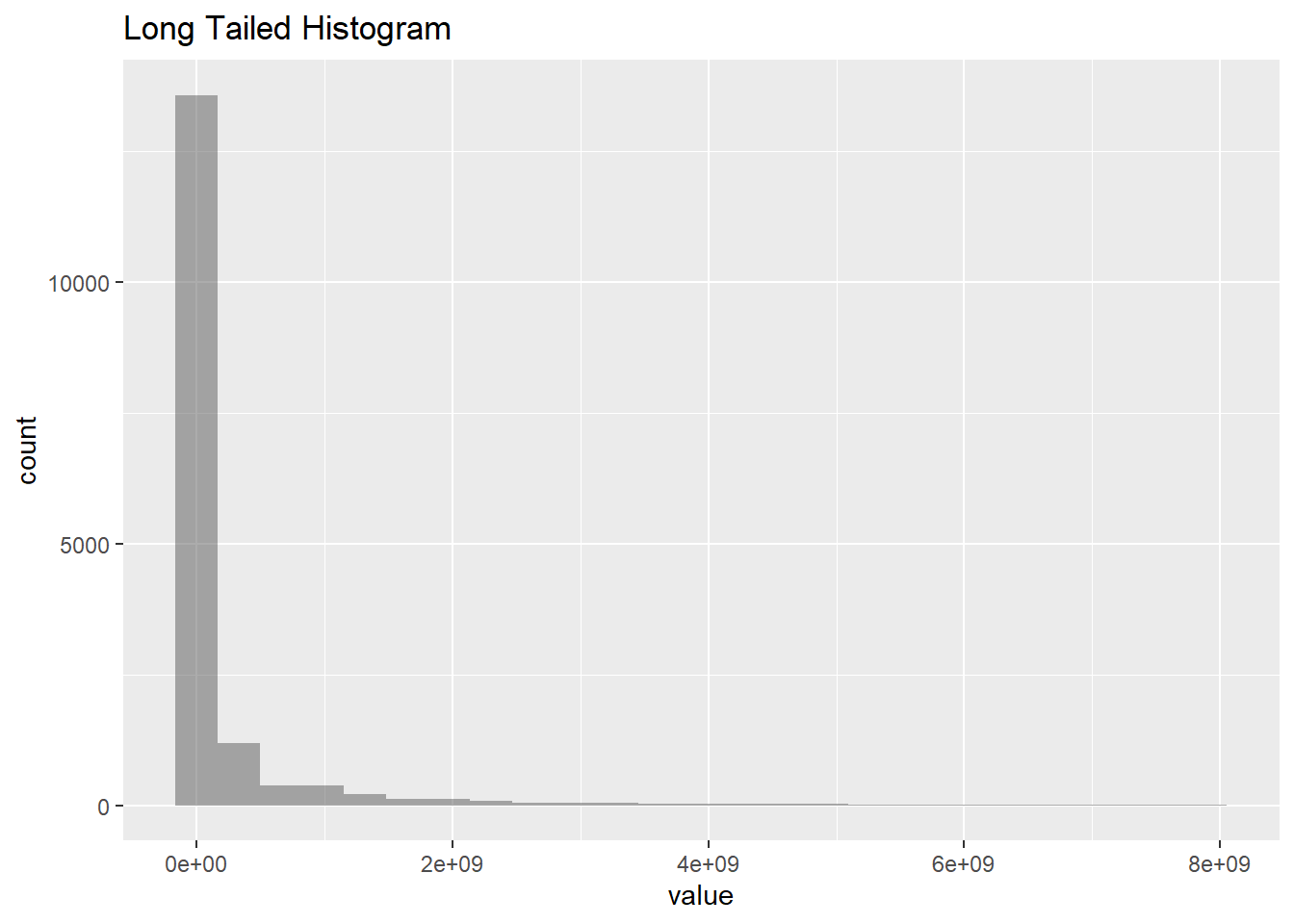
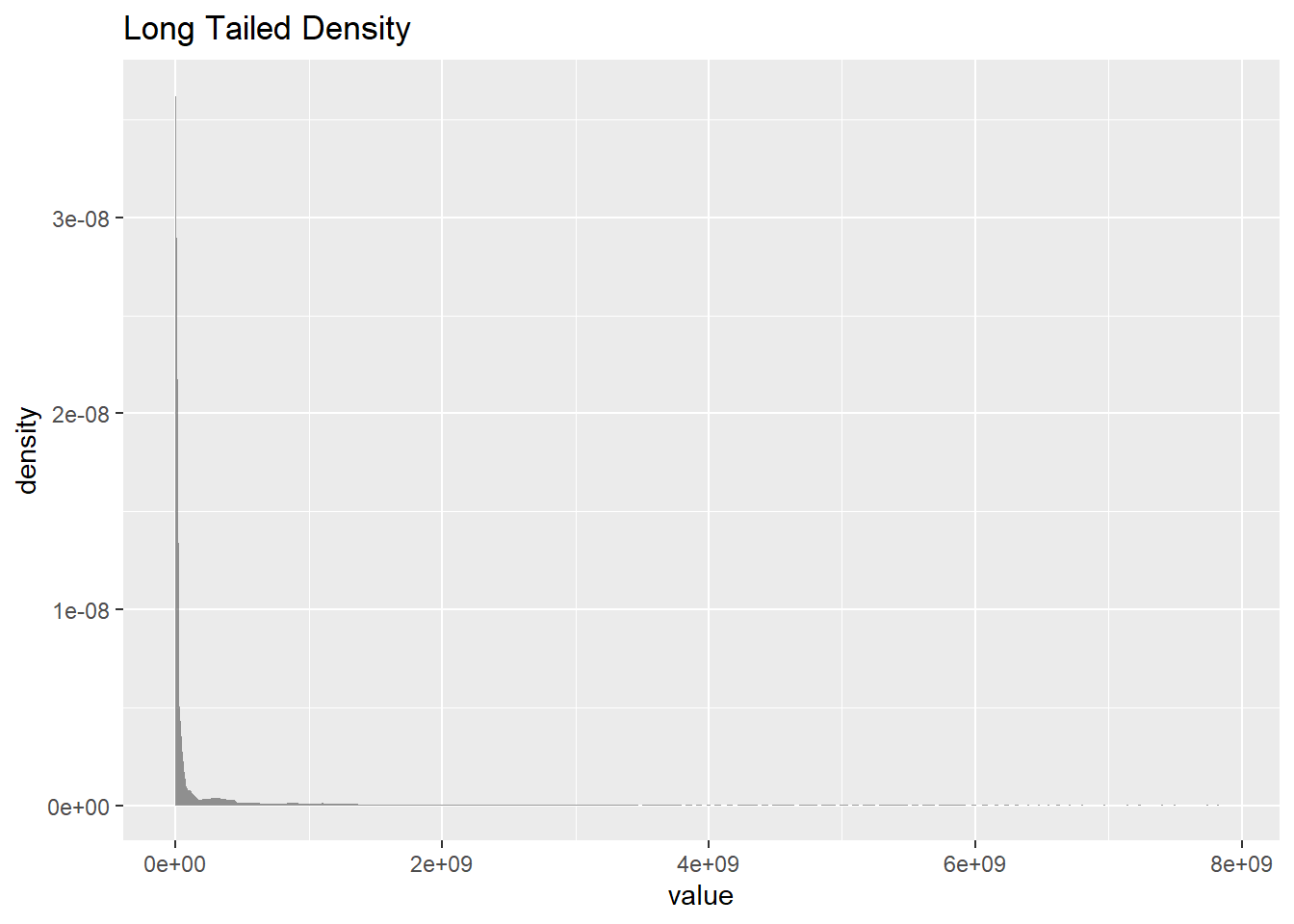
Plotting for value

gf_histogram(~value, data = pop, title = "Long Tailed Histogram")

gf_density(~value, data = pop, title = "Long Tailed Density")

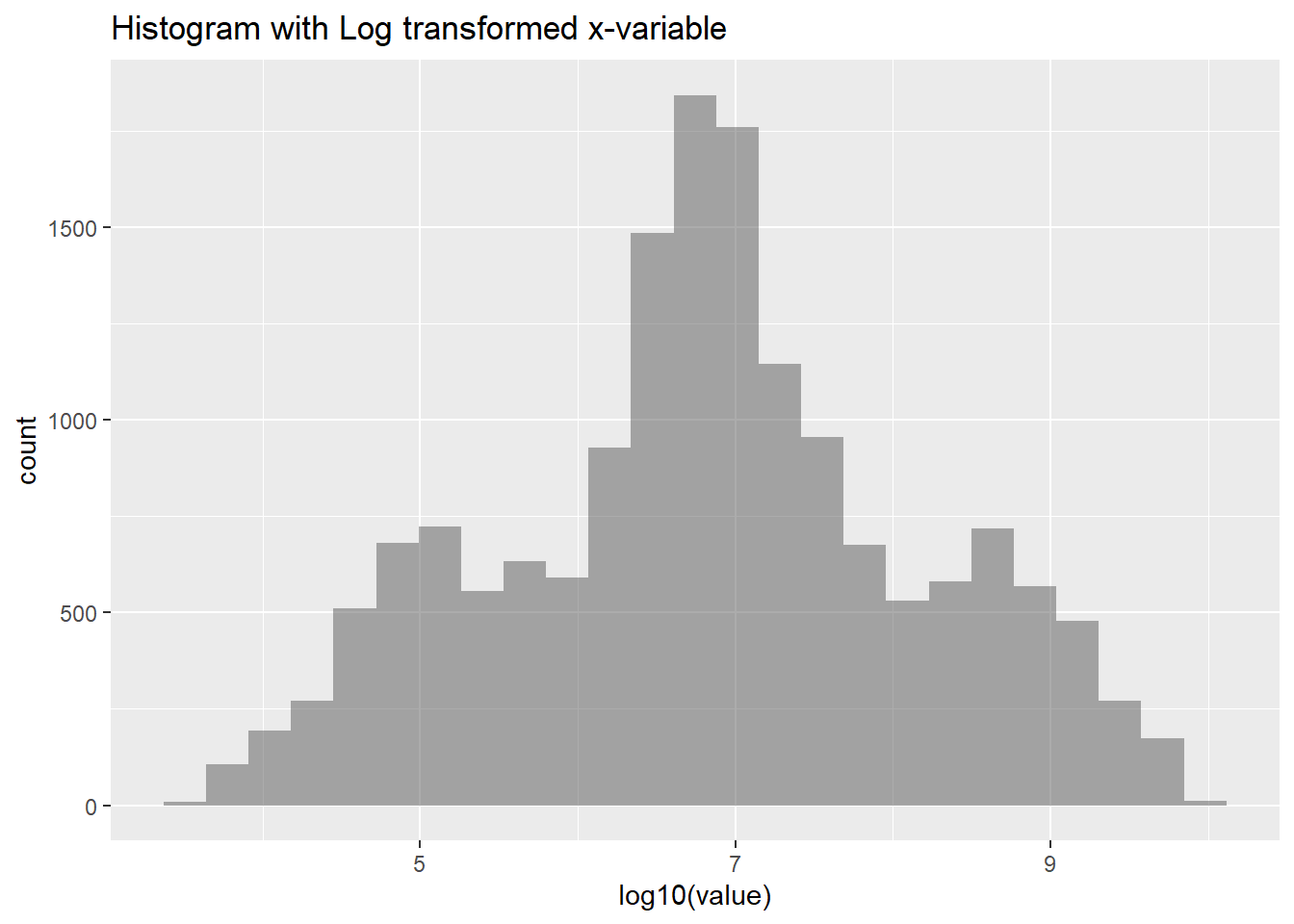
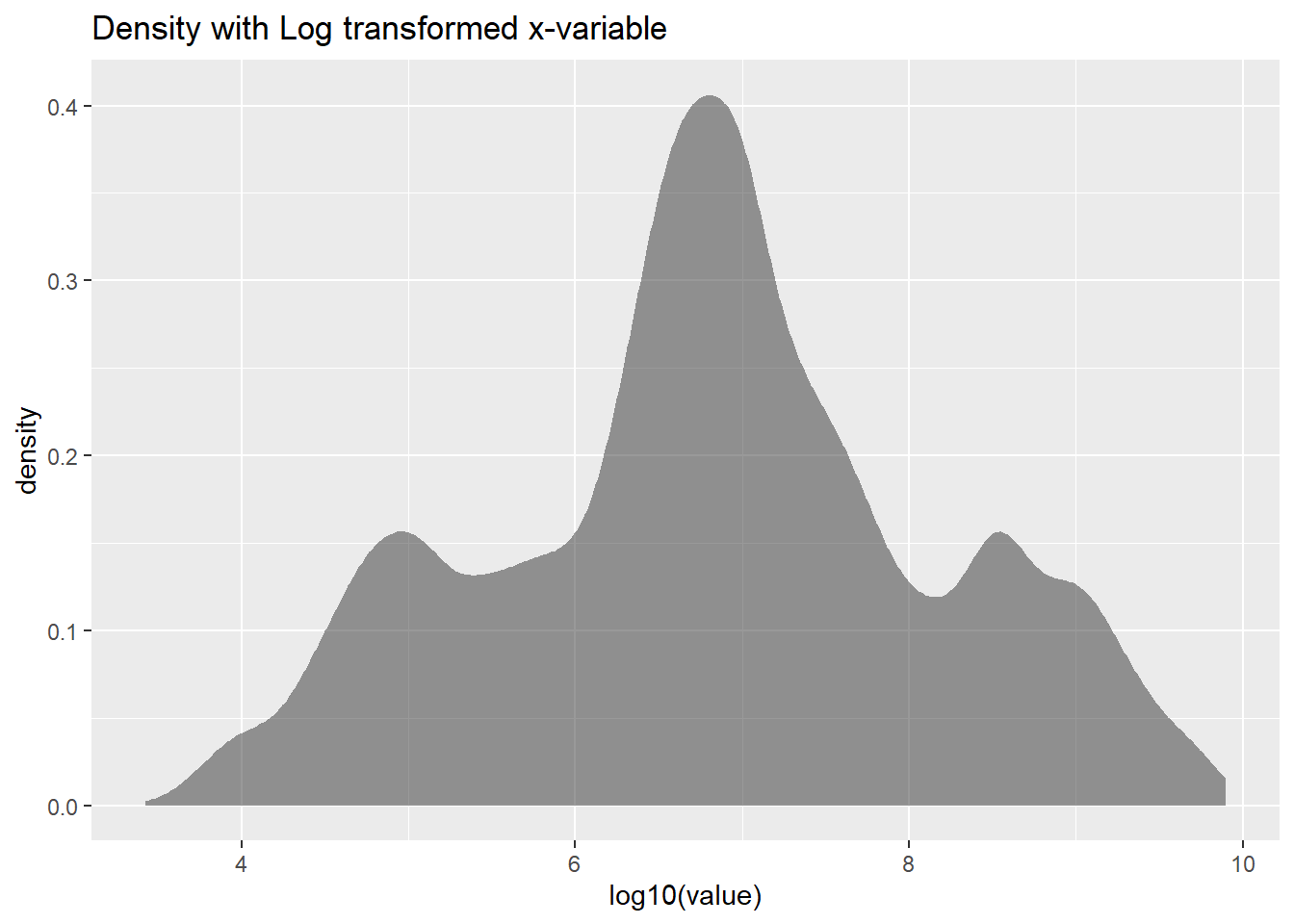
Plotting using log

Notes:

The log10(value) part applies a logarithmic transformation to the variable value using base 10. This transformation helps to compress the scale of the data, which is particularly useful when dealing with data that spans several orders of magnitude or has a right-skewed distribution.

gf_histogram(~ log10(value), data = pop, title = "Histogram with Log transformed x-variable")

gf_density(~ log10(value), data = pop, title = "Density with Log transformed x-variable")

Dataset: Faithful

faithful
    eruptions waiting
1       3.600      79
2       1.800      54
3       3.333      74
4       2.283      62
5       4.533      85
6       2.883      55
7       4.700      88
8       3.600      85
9       1.950      51
10      4.350      85
11      1.833      54
12      3.917      84
13      4.200      78
14      1.750      47
15      4.700      83
16      2.167      52
17      1.750      62
18      4.800      84
19      1.600      52
20      4.250      79
21      1.800      51
22      1.750      47
23      3.450      78
24      3.067      69
25      4.533      74
26      3.600      83
27      1.967      55
28      4.083      76
29      3.850      78
30      4.433      79
31      4.300      73
32      4.467      77
33      3.367      66
34      4.033      80
35      3.833      74
36      2.017      52
37      1.867      48
38      4.833      80
39      1.833      59
40      4.783      90
41      4.350      80
42      1.883      58
43      4.567      84
44      1.750      58
45      4.533      73
46      3.317      83
47      3.833      64
48      2.100      53
49      4.633      82
50      2.000      59
51      4.800      75
52      4.716      90
53      1.833      54
54      4.833      80
55      1.733      54
56      4.883      83
57      3.717      71
58      1.667      64
59      4.567      77
60      4.317      81
61      2.233      59
62      4.500      84
63      1.750      48
64      4.800      82
65      1.817      60
66      4.400      92
67      4.167      78
68      4.700      78
69      2.067      65
70      4.700      73
71      4.033      82
72      1.967      56
73      4.500      79
74      4.000      71
75      1.983      62
76      5.067      76
77      2.017      60
78      4.567      78
79      3.883      76
80      3.600      83
81      4.133      75
82      4.333      82
83      4.100      70
84      2.633      65
85      4.067      73
86      4.933      88
87      3.950      76
88      4.517      80
89      2.167      48
90      4.000      86
91      2.200      60
92      4.333      90
93      1.867      50
94      4.817      78
95      1.833      63
96      4.300      72
97      4.667      84
98      3.750      75
99      1.867      51
100     4.900      82
101     2.483      62
102     4.367      88
103     2.100      49
104     4.500      83
105     4.050      81
106     1.867      47
107     4.700      84
108     1.783      52
109     4.850      86
110     3.683      81
111     4.733      75
112     2.300      59
113     4.900      89
114     4.417      79
115     1.700      59
116     4.633      81
117     2.317      50
118     4.600      85
119     1.817      59
120     4.417      87
121     2.617      53
122     4.067      69
123     4.250      77
124     1.967      56
125     4.600      88
126     3.767      81
127     1.917      45
128     4.500      82
129     2.267      55
130     4.650      90
131     1.867      45
132     4.167      83
133     2.800      56
134     4.333      89
135     1.833      46
136     4.383      82
137     1.883      51
138     4.933      86
139     2.033      53
140     3.733      79
141     4.233      81
142     2.233      60
143     4.533      82
144     4.817      77
145     4.333      76
146     1.983      59
147     4.633      80
148     2.017      49
149     5.100      96
150     1.800      53
151     5.033      77
152     4.000      77
153     2.400      65
154     4.600      81
155     3.567      71
156     4.000      70
157     4.500      81
158     4.083      93
159     1.800      53
160     3.967      89
161     2.200      45
162     4.150      86
163     2.000      58
164     3.833      78
165     3.500      66
166     4.583      76
167     2.367      63
168     5.000      88
169     1.933      52
170     4.617      93
171     1.917      49
172     2.083      57
173     4.583      77
174     3.333      68
175     4.167      81
176     4.333      81
177     4.500      73
178     2.417      50
179     4.000      85
180     4.167      74
181     1.883      55
182     4.583      77
183     4.250      83
184     3.767      83
185     2.033      51
186     4.433      78
187     4.083      84
188     1.833      46
189     4.417      83
190     2.183      55
191     4.800      81
192     1.833      57
193     4.800      76
194     4.100      84
195     3.966      77
196     4.233      81
197     3.500      87
198     4.366      77
199     2.250      51
200     4.667      78
201     2.100      60
202     4.350      82
203     4.133      91
204     1.867      53
205     4.600      78
206     1.783      46
207     4.367      77
208     3.850      84
209     1.933      49
210     4.500      83
211     2.383      71
212     4.700      80
213     1.867      49
214     3.833      75
215     3.417      64
216     4.233      76
217     2.400      53
218     4.800      94
219     2.000      55
220     4.150      76
221     1.867      50
222     4.267      82
223     1.750      54
224     4.483      75
225     4.000      78
226     4.117      79
227     4.083      78
228     4.267      78
229     3.917      70
230     4.550      79
231     4.083      70
232     2.417      54
233     4.183      86
234     2.217      50
235     4.450      90
236     1.883      54
237     1.850      54
238     4.283      77
239     3.950      79
240     2.333      64
241     4.150      75
242     2.350      47
243     4.933      86
244     2.900      63
245     4.583      85
246     3.833      82
247     2.083      57
248     4.367      82
249     2.133      67
250     4.350      74
251     2.200      54
252     4.450      83
253     3.567      73
254     4.500      73
255     4.150      88
256     3.817      80
257     3.917      71
258     4.450      83
259     2.000      56
260     4.283      79
261     4.767      78
262     4.533      84
263     1.850      58
264     4.250      83
265     1.983      43
266     2.250      60
267     4.750      75
268     4.117      81
269     2.150      46
270     4.417      90
271     1.817      46
272     4.467      74

Organizing the dataset

glimpse(faithful)
Rows: 272
Columns: 2
$ eruptions <dbl> 3.600, 1.800, 3.333, 2.283, 4.533, 2.883, 4.700, 3.600, 1.95…
$ waiting   <dbl> 79, 54, 74, 62, 85, 55, 88, 85, 51, 85, 54, 84, 78, 47, 83, …
inspect(faithful)

quantitative variables:  
       name   class  min       Q1 median       Q3  max      mean        sd   n
1 eruptions numeric  1.6  2.16275      4  4.45425  5.1  3.487783  1.141371 272
2   waiting numeric 43.0 58.00000     76 82.00000 96.0 70.897059 13.594974 272
  missing
1       0
2       0
skim(faithful)
Data summary
Name faithful
Number of rows 272
Number of columns 2
_______________________
Column type frequency:
numeric 2
________________________
Group variables None

Variable type: numeric

skim_variable n_missing complete_rate mean sd p0 p25 p50 p75 p100 hist
eruptions 0 1 3.49 1.14 1.6 2.16 4 4.45 5.1 ▇▂▂▇▇
waiting 0 1 70.90 13.59 43.0 58.00 76 82.00 96.0 ▃▃▂▇▂

Eruption Data

gf_histogram(~eruptions, data = faithful) %>%
  gf_labs(
    title = "Plot 1: Eruptions",
    caption = "ggformula"
  )

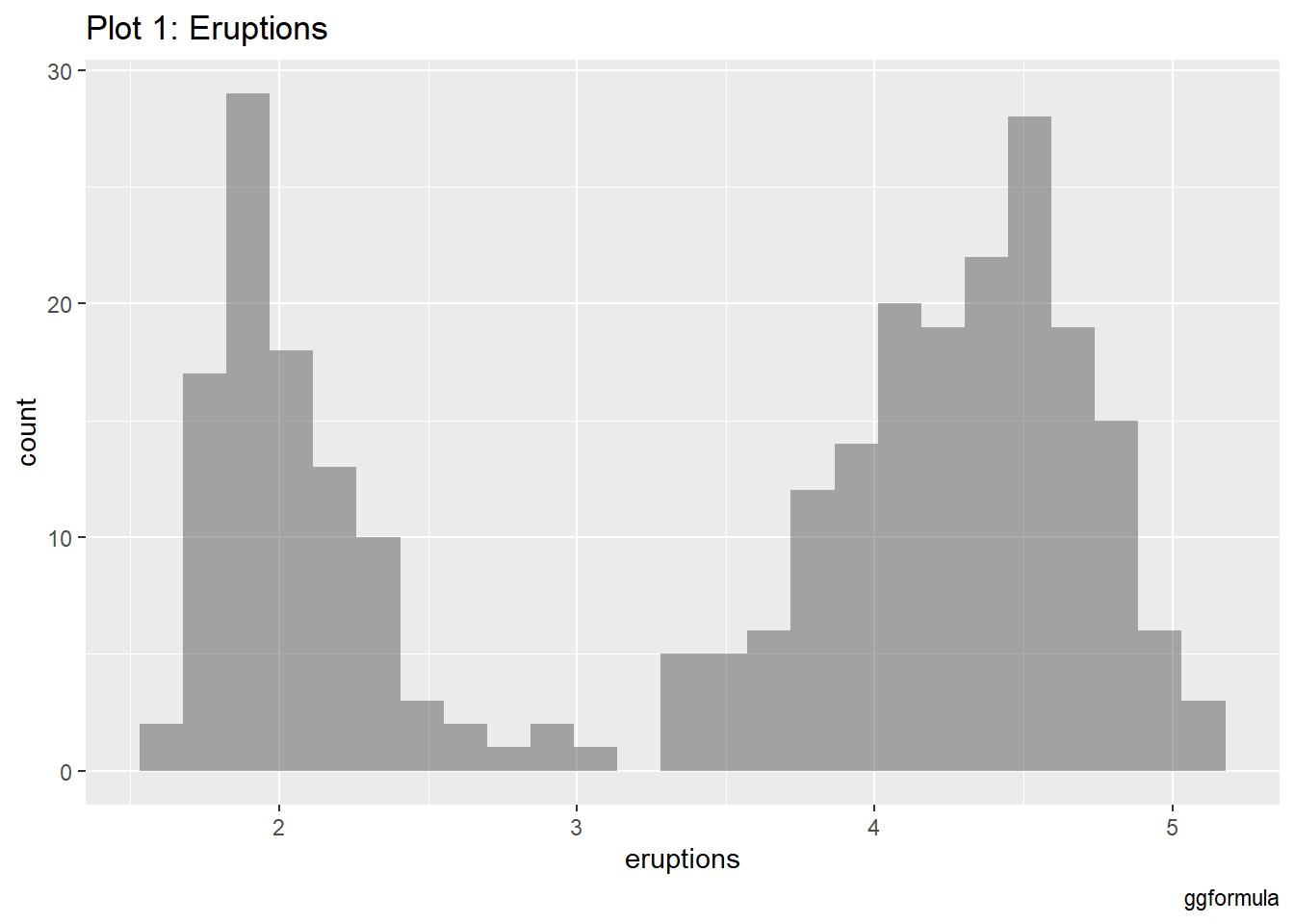
This provides a basic view of the distribution of eruption times, which shows that the eruption times are bimodal—there are two peaks, indicating two common durations for eruptions: shorter and longer ones.

Eruption data with bins

gf_histogram(~eruptions, data = faithful, bins = 150) %>%
  gf_labs(
    title = "Plot 2: Eruptions",
    caption = "ggformula"
  )

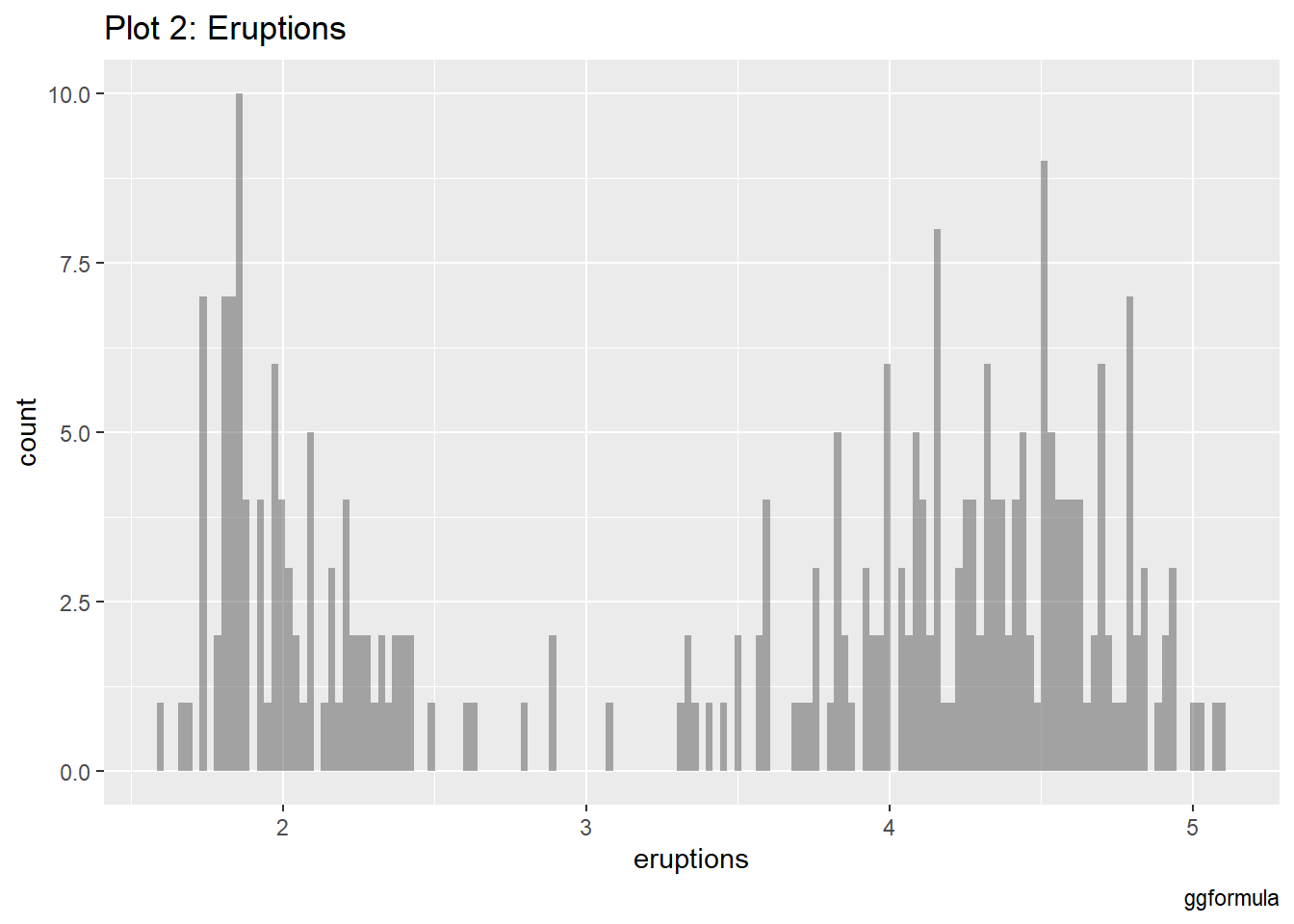
In this plot, the number of bins has been increased to 150. This results in a finer granularity, showing more of the detailed variations within the eruption times.

Waiting Data with bins

gf_histogram(~waiting, data = faithful, bins = 50) %>%
  gf_labs(
    title = "Plot 3: Eruptions",
    caption = "ggformula"
  )

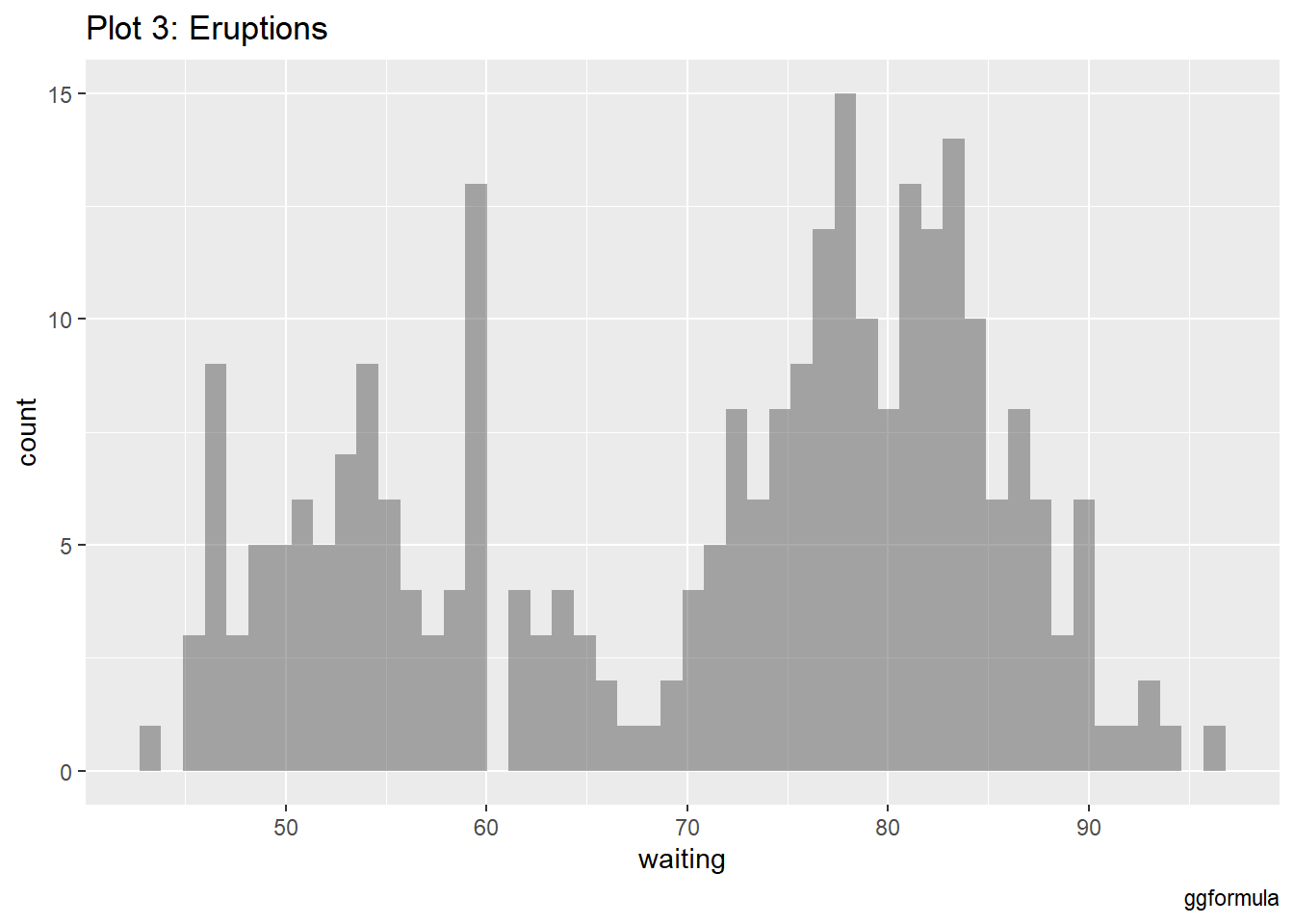
With 50 bins, it shows a unimodal distribution, with most waiting times clustering around the middle (around 70-80 minutes).

Factorization

eruption_duration_factor <- faithful %>%
  mutate(
    eruption_category = case_when(
      eruptions <= 3 ~ "short",
      eruptions > 3 ~ "long",
      .default = "unknown"
    )
  )

Eruptions durations

gf_histogram(~eruptions, fill = ~eruption_category, data = eruption_duration_factor, bins = 150) %>%
  gf_labs(
    title = "Plot 4: Eruption Duration Categories",
    caption = "ggformula"
  )%>% 
    gf_refine(scale_fill_manual(values = c("darkgreen", "orange")))

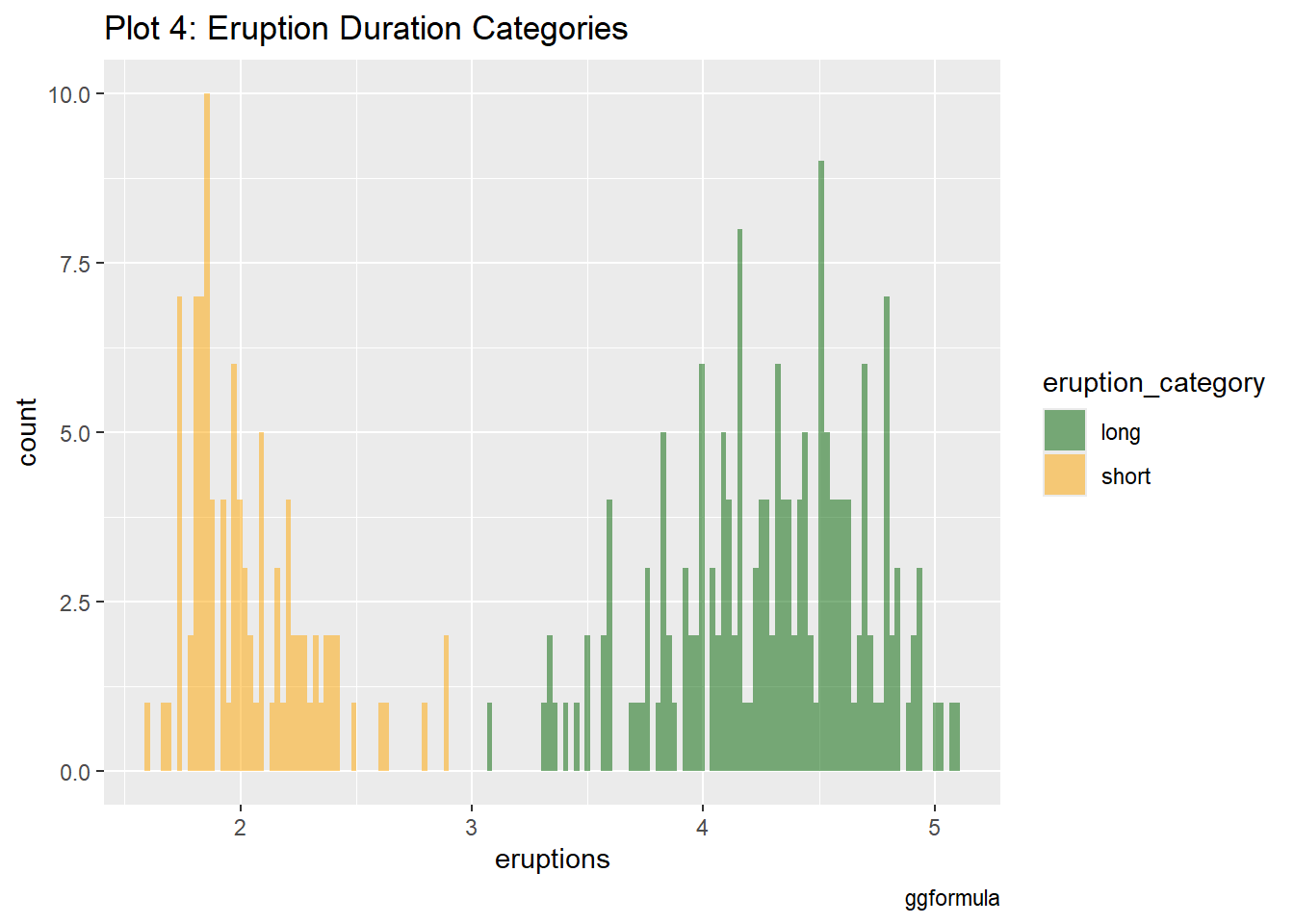
The eruption durations are now divided into two categories: “short” and “long” eruptions, using a threshold of 3 minutes. The histogram shows that short eruptions are more frequent, while longer eruptions are less common but still significant.

Waiting times vary for short vs. long eruptions

gf_histogram(~waiting, fill = ~eruption_category, data = eruption_duration_factor, bins = 100) %>%
  gf_labs(
    title = "Plot 5A: Waiting Times for Eruption Duration Categories",
    caption = "ggformula"
  )%>% 
    gf_refine(scale_fill_manual(values = c("darkgreen", "orange")))

gf_histogram(~waiting, fill = ~eruption_category, data = eruption_duration_factor, bins = 50) %>%
  gf_facet_wrap(~~eruption_category, scales = "free_y") %>%
  gf_labs(
    title = "Plot 5B: Waiting Times for Eruption Duration Categories",
    caption = "ggformula"
  )%>% 
    gf_refine(scale_fill_manual(values = c("darkgreen", "orange")))

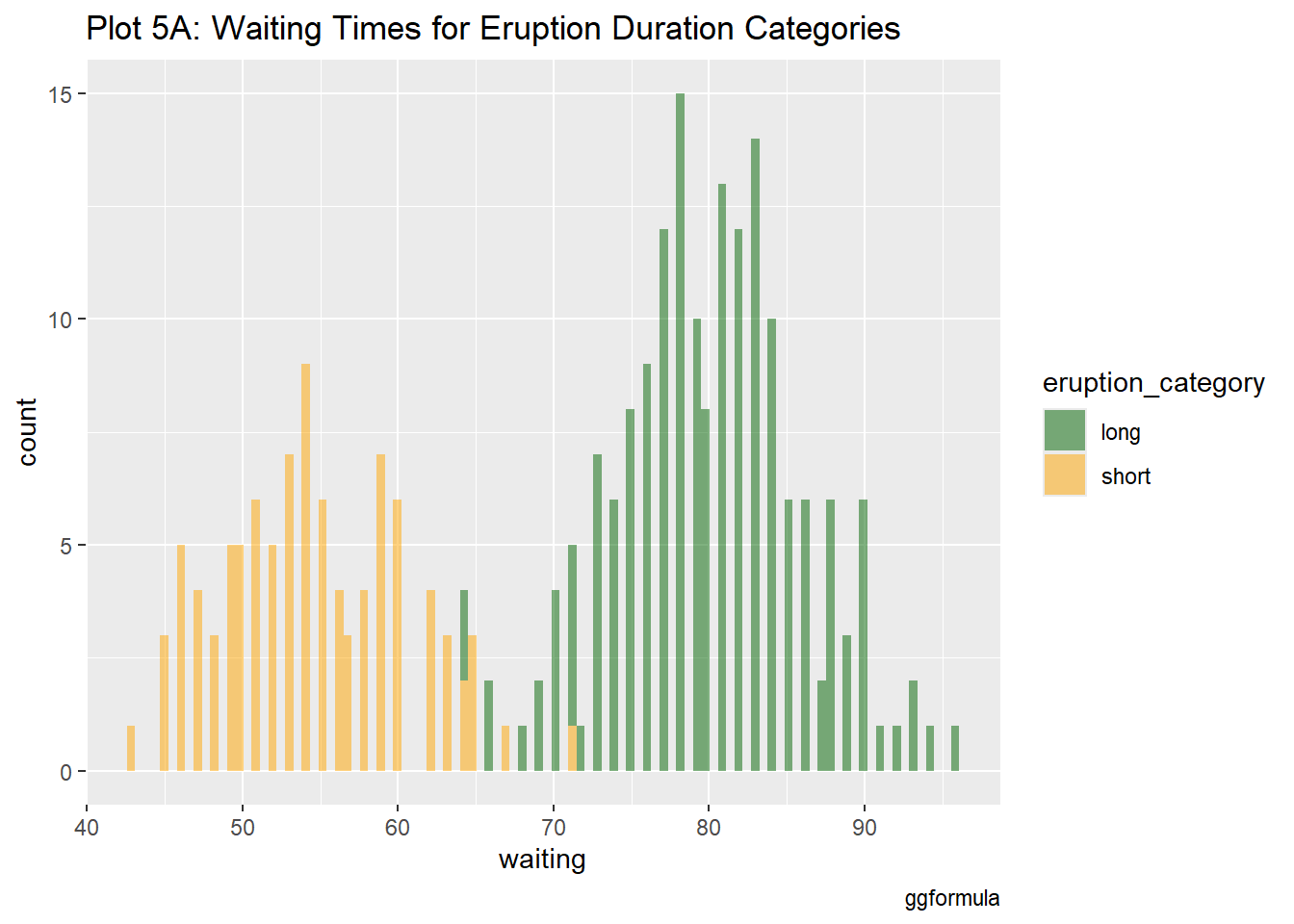
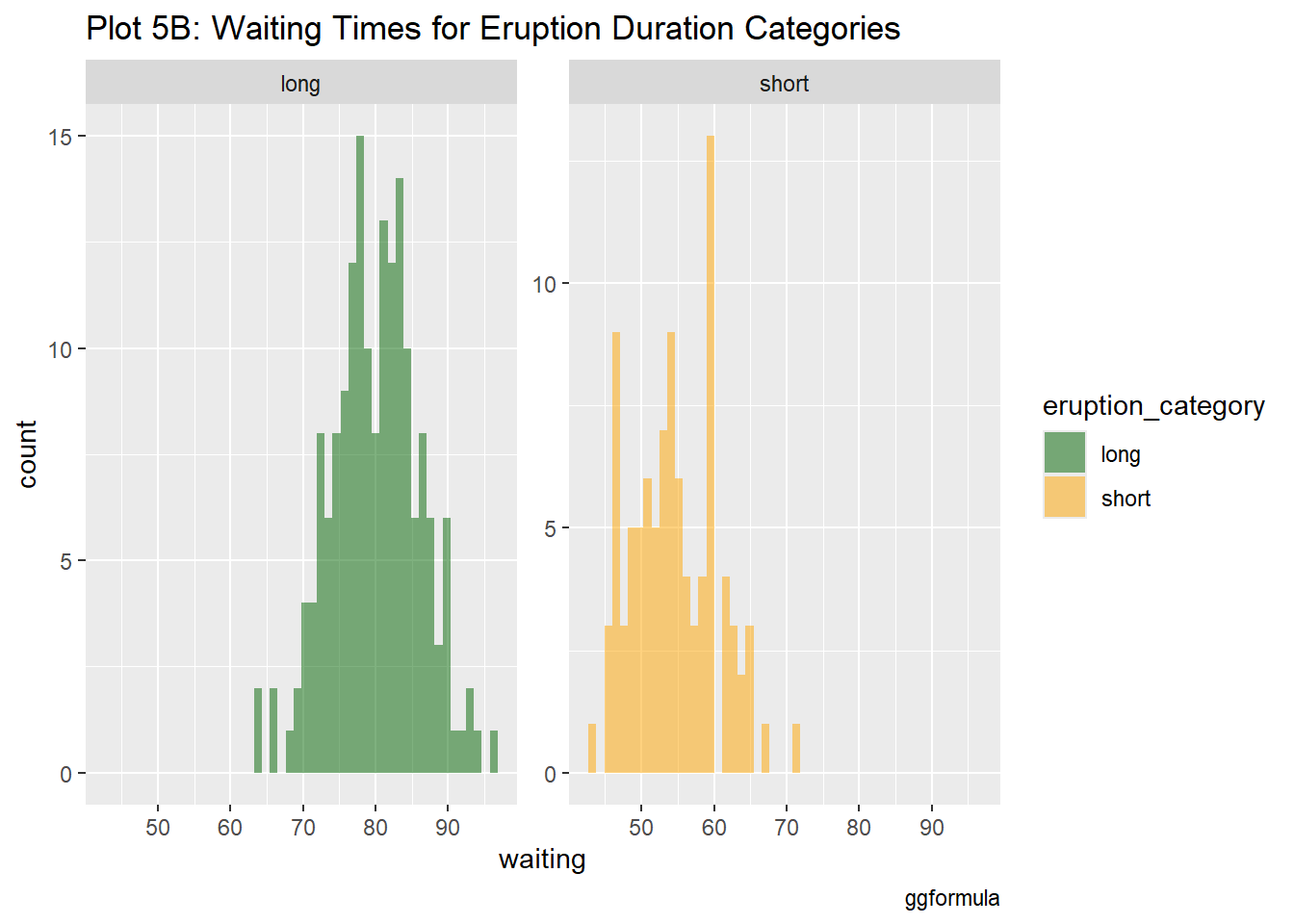
These histograms explore how waiting times vary depending on whether the eruption was categorized as short or long. In both plots, waiting times for long eruptions tend to be longer, with waiting times clustering higher for long eruptions. The faceted plot (5B) separates the data into distinct subplots for short and long eruptions

Number of eruptions in each category of duration

eruption_counts <- eruption_duration_factor %>%
  group_by(eruption_category) %>%
  summarize(count = n())

eruption_counts
# A tibble: 2 × 2
  eruption_category count
  <chr>             <int>
1 long                175
2 short                97
eruption_duration_extra <- faithful %>%
  mutate(
    eruption_more = case_when(
      eruptions > 1 & eruptions <= 2.0 ~ "very_short",
      eruptions > 2 & eruptions <= 3.0 ~ "short",
      eruptions > 3 & eruptions <= 4.0 ~ "medium",
      eruptions > 4 ~ "long",
      .default = "unknown"
    )
  )
gf_histogram(~waiting, fill = ~eruption_more, data = eruption_duration_extra, bins = 100) %>%
  gf_labs(
    title = "Plot 6A: Waiting Times for Eruption Duration Categories",
    caption = "ggformula"
  )%>% 
    gf_refine(scale_fill_manual(values = c("darkgreen","brown", "orange","yellow")))

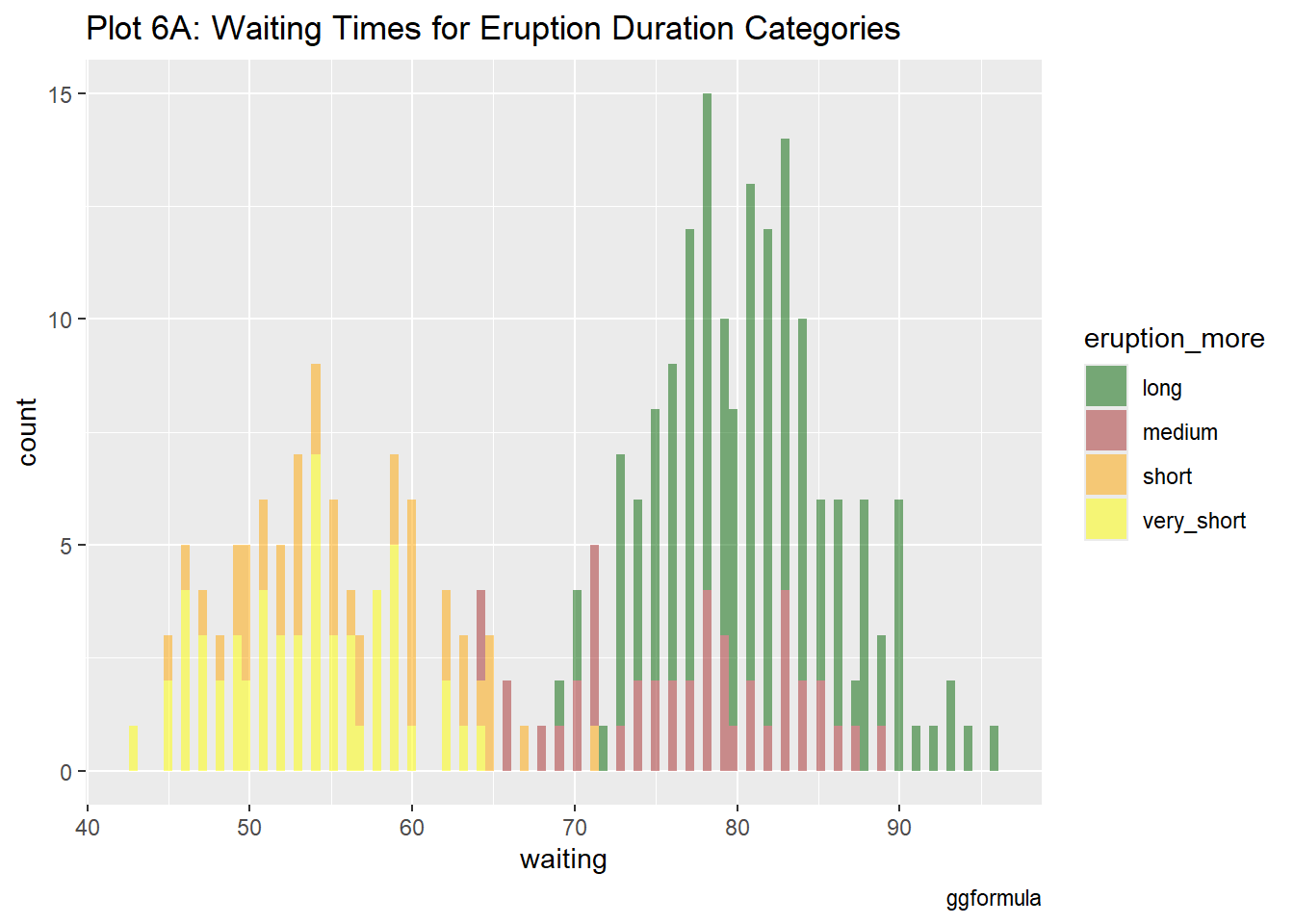
Eruptions are grouped into “very short,” “short,” “medium,” and “long.” The histogram displays waiting times for each category. The longer eruptions have longer waiting times. 

gf_histogram(~waiting, fill = ~eruption_more, data = eruption_duration_extra, bins = 50, color = "black") %>%
  gf_facet_wrap(~~eruption_more, scales = "free_y") %>%
  gf_labs(
    title = "Plot 6A: Waiting Times for Eruption Duration Categories",
    caption = "ggformula"
  )%>% 
    gf_refine(scale_fill_manual(values = c("darkgreen","brown", "orange","yellow")))

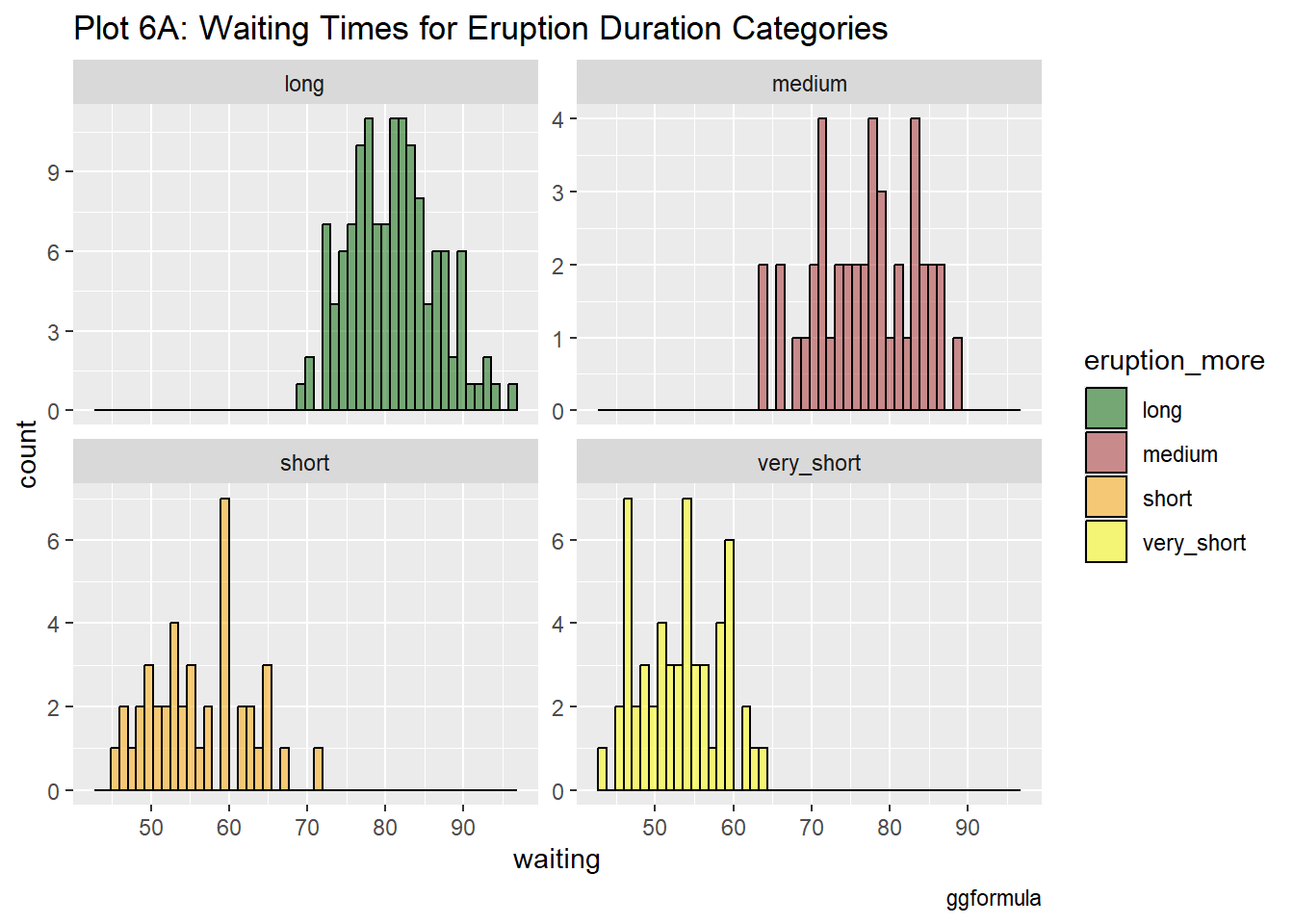
This plot, divided by eruption categories of very short, short, medium, and long, shows how waiting times vary in each group. Each subplot offers detailed insights for direct comparison. Waiting times for shorter eruptions are more consistent, while longer eruptions show a wider range of waiting times.