A2-Part I

Movie Profits

Author

Sara S

Dataset: Movie Profits

Introduction

In this analysis, we explore the profitability of movies based on a dataset containing information about production budgets, gross earnings, and various qualitative aspects of films. The primary objective is to assess which genres yield the highest profit and to analyze how different factors such as release dates, distributors, and ratings contribute to movie success.

Installing Packages

library(tidyverse)
── Attaching core tidyverse packages ──────────────────────── tidyverse 2.0.0 ──
✔ dplyr     1.1.4     ✔ readr     2.1.5
✔ forcats   1.0.0     ✔ stringr   1.5.1
✔ ggplot2   3.5.1     ✔ tibble    3.2.1
✔ lubridate 1.9.3     ✔ tidyr     1.3.1
✔ purrr     1.0.2     
── Conflicts ────────────────────────────────────────── tidyverse_conflicts() ──
✖ dplyr::filter() masks stats::filter()
✖ dplyr::lag()    masks stats::lag()
ℹ Use the conflicted package (<http://conflicted.r-lib.org/>) to force all conflicts to become errors
library(mosaic)
Registered S3 method overwritten by 'mosaic':
  method                           from   
  fortify.SpatialPolygonsDataFrame ggplot2

The 'mosaic' package masks several functions from core packages in order to add 
additional features.  The original behavior of these functions should not be affected by this.

Attaching package: 'mosaic'

The following object is masked from 'package:Matrix':

    mean

The following objects are masked from 'package:dplyr':

    count, do, tally

The following object is masked from 'package:purrr':

    cross

The following object is masked from 'package:ggplot2':

    stat

The following objects are masked from 'package:stats':

    binom.test, cor, cor.test, cov, fivenum, IQR, median, prop.test,
    quantile, sd, t.test, var

The following objects are masked from 'package:base':

    max, mean, min, prod, range, sample, sum
library(skimr)

Attaching package: 'skimr'

The following object is masked from 'package:mosaic':

    n_missing
library(ggformula)

Importing the dataset

movies <- read_delim("../../data/movie_profit.csv", delim = ";")
Rows: 3310 Columns: 10
── Column specification ────────────────────────────────────────────────────────
Delimiter: ";"
chr  (4): movie, distributor, mpaa_rating, genre
dbl  (4): production_budget, domestic_gross, worldwide_gross, decade
num  (1): profit_ratio
date (1): release_date

ℹ Use `spec()` to retrieve the full column specification for this data.
ℹ Specify the column types or set `show_col_types = FALSE` to quiet this message.
movies
# A tibble: 3,310 × 10
   release_date movie           production_budget domestic_gross worldwide_gross
   <date>       <chr>                       <dbl>          <dbl>           <dbl>
 1 2005-07-22   November                   250000         191862          191862
 2 1998-08-28   I Married a St…            250000         203134          203134
 3 1997-03-28   Love and Other…            250000         212285          743216
 4 2000-07-14   Chuck&Buck                 250000        1055671         1157672
 5 2011-10-28   Like Crazy                 250000        3395391         3728400
 6 2003-04-11   Better Luck To…            250000        3802390         3809226
 7 2017-04-28   Sleight                    250000        3930990         3934450
 8 2002-06-28   Lovely and Ama…            250000        4210379         4613482
 9 2012-08-17   Compliance                 270000         319285          830700
10 2005-05-06   Fighting Tommy…            300000          10514           10514
# ℹ 3,300 more rows
# ℹ 5 more variables: distributor <chr>, mpaa_rating <chr>, genre <chr>,
#   profit_ratio <dbl>, decade <dbl>

Organizing the data

glimpse(movies)
Rows: 3,310
Columns: 10
$ release_date      <date> 2005-07-22, 1998-08-28, 1997-03-28, 2000-07-14, 201…
$ movie             <chr> "November", "I Married a Strange Person", "Love and …
$ production_budget <dbl> 250000, 250000, 250000, 250000, 250000, 250000, 2500…
$ domestic_gross    <dbl> 191862, 203134, 212285, 1055671, 3395391, 3802390, 3…
$ worldwide_gross   <dbl> 191862, 203134, 743216, 1157672, 3728400, 3809226, 3…
$ distributor       <chr> "Other", "Other", "Other", "Other", "Paramount Pictu…
$ mpaa_rating       <chr> "R", NA, "R", "R", "PG-13", "R", "R", "R", "R", "R",…
$ genre             <chr> "Drama", "Comedy", "Comedy", "Drama", "Drama", "Dram…
$ profit_ratio      <dbl> 7.674480e+13, 8.125360e+13, 2.972864e+14, 4.630688e+…
$ decade            <dbl> 2000, 1990, 1990, 2000, 2010, 2000, 2010, 2000, 2010…
inspect(movies)

categorical variables:  
         name     class levels    n missing
1       movie character   3310 3310       0
2 distributor character      6 3268      42
3 mpaa_rating character      4 3180     130
4       genre character      5 3310       0
                                   distribution
1 10 Days in a Madhouse (0%) ...               
2  Other (53.2%), Warner Bros. (11%) ...       
3 R (46.4%), PG-13 (33.5%), PG (17.4%) ...     
4 Drama (36.5%), Comedy (24.1%) ...            

Date variables:  
          name class      first       last min_diff  max_diff    n missing
1 release_date  Date 1936-02-05 2017-12-22   0 days 2592 days 3310       0

quantitative variables:  
               name   class      min           Q1       median           Q3
1 production_budget numeric 2.50e+05 9.500000e+06 2.000000e+07 4.500000e+07
2    domestic_gross numeric 0.00e+00 6.530094e+06 2.558731e+07 6.046695e+07
3   worldwide_gross numeric 4.23e+02 1.086144e+07 4.040903e+07 1.184703e+08
4      profit_ratio numeric 1.38e+10 7.861269e+13 1.962499e+14 3.942158e+14
5            decade numeric 1.93e+03 1.990000e+03 2.000000e+03 2.010000e+03
           max         mean           sd    n missing
1 1.750000e+08 3.326794e+07 3.460741e+07 3310       0
2 4.745447e+08 4.551509e+07 5.852794e+07 3310       0
3 1.162782e+09 9.384123e+07 1.389514e+08 3310       0
4 4.315179e+16 4.319388e+14 1.501736e+15 3310       0
5 2.010000e+03 1.998785e+03 1.061308e+01 3310       0
skim(movies)
Data summary
Name movies
Number of rows 3310
Number of columns 10
_______________________
Column type frequency:
character 4
Date 1
numeric 5
________________________
Group variables None

Variable type: character

skim_variable n_missing complete_rate min max empty n_unique whitespace
movie 0 1.00 1 35 0 3310 0
distributor 42 0.99 5 18 0 6 0
mpaa_rating 130 0.96 1 5 0 4 0
genre 0 1.00 5 9 0 5 0

Variable type: Date

skim_variable n_missing complete_rate min max median n_unique
release_date 0 1 1936-02-05 2017-12-22 2005-06-30 1723

Variable type: numeric

skim_variable n_missing complete_rate mean sd p0 p25 p50 p75 p100 hist
production_budget 0 1 3.326794e+07 3.460741e+07 2.50e+05 9.500000e+06 2.000000e+07 4.500000e+07 1.750000e+08 ▇▂▁▁▁
domestic_gross 0 1 4.551509e+07 5.852794e+07 0.00e+00 6.530094e+06 2.558731e+07 6.046695e+07 4.745447e+08 ▇▁▁▁▁
worldwide_gross 0 1 9.384123e+07 1.389514e+08 4.23e+02 1.086144e+07 4.040903e+07 1.184703e+08 1.162782e+09 ▇▁▁▁▁
profit_ratio 0 1 4.319388e+14 1.501736e+15 1.38e+10 7.861269e+13 1.962499e+14 3.942158e+14 4.315179e+16 ▇▁▁▁▁
decade 0 1 1.998790e+03 1.061000e+01 1.93e+03 1.990000e+03 2.000000e+03 2.010000e+03 2.010000e+03 ▁▁▁▃▇

Data Dictionary

Quantitative Variables:

  • production_budget (<dbl>): The cost of producing the movie.

  • domestic_gross (<dbl>): Revenue earned from domestic markets.

  • worldwide_gross (<dbl>): Total revenue earned from all markets.

  • profit_ratio (<dbl>): The ratio of profit, calculated based on budget and gross earnings.

Qualitative Variables:

  • release_date (<date>): The date the movie was released.

  • decade (<dbl>): The decade in which the movie was released, derived from the date of release.

  • movie (<chr>): The name of the movie.

  • distributor (<chr>): The company that distributed the movie.

  • mpaa_rating (<chr>): The movie’s rating like PG-18, PG-13.

  • genre (<chr>): The genre of the movie such as drama, comedy and action.

Factorization

movies_modified <- movies %>%
  dplyr::mutate(
    decade = as_factor(decade),
    genre = as_factor(genre),
    mpaa_rating = as_factor(mpaa_rating),
    distributor = as_factor(distributor)
  )
glimpse(movies_modified)
Rows: 3,310
Columns: 10
$ release_date      <date> 2005-07-22, 1998-08-28, 1997-03-28, 2000-07-14, 201…
$ movie             <chr> "November", "I Married a Strange Person", "Love and …
$ production_budget <dbl> 250000, 250000, 250000, 250000, 250000, 250000, 2500…
$ domestic_gross    <dbl> 191862, 203134, 212285, 1055671, 3395391, 3802390, 3…
$ worldwide_gross   <dbl> 191862, 203134, 743216, 1157672, 3728400, 3809226, 3…
$ distributor       <fct> Other, Other, Other, Other, Paramount Pictures, Para…
$ mpaa_rating       <fct> R, NA, R, R, PG-13, R, R, R, R, R, R, R, PG-13, NA, …
$ genre             <fct> Drama, Comedy, Comedy, Drama, Drama, Drama, Action, …
$ profit_ratio      <dbl> 7.674480e+13, 8.125360e+13, 2.972864e+14, 4.630688e+…
$ decade            <fct> 2000, 1990, 1990, 2000, 2010, 2000, 2010, 2000, 2010…
inspect(movies_modified)

categorical variables:  
         name     class levels    n missing
1       movie character   3310 3310       0
2 distributor    factor      6 3268      42
3 mpaa_rating    factor      4 3180     130
4       genre    factor      5 3310       0
5      decade    factor      9 3310       0
                                   distribution
1 10 Days in a Madhouse (0%) ...               
2  Other (53.2%), Warner Bros. (11%) ...       
3 R (46.4%), PG-13 (33.5%), PG (17.4%) ...     
4 Drama (36.5%), Comedy (24.1%) ...            
5 2000 (41.9%), 2010 (30%) ...                 

Date variables:  
          name class      first       last min_diff  max_diff    n missing
1 release_date  Date 1936-02-05 2017-12-22   0 days 2592 days 3310       0

quantitative variables:  
               name   class      min           Q1       median           Q3
1 production_budget numeric 2.50e+05 9.500000e+06 2.000000e+07 4.500000e+07
2    domestic_gross numeric 0.00e+00 6.530094e+06 2.558731e+07 6.046695e+07
3   worldwide_gross numeric 4.23e+02 1.086144e+07 4.040903e+07 1.184703e+08
4      profit_ratio numeric 1.38e+10 7.861269e+13 1.962499e+14 3.942158e+14
           max         mean           sd    n missing
1 1.750000e+08 3.326794e+07 3.460741e+07 3310       0
2 4.745447e+08 4.551509e+07 5.852794e+07 3310       0
3 1.162782e+09 9.384123e+07 1.389514e+08 3310       0
4 4.315179e+16 4.319388e+14 1.501736e+15 3310       0
skim(movies_modified)
Data summary
Name movies_modified
Number of rows 3310
Number of columns 10
_______________________
Column type frequency:
character 1
Date 1
factor 4
numeric 4
________________________
Group variables None

Variable type: character

skim_variable n_missing complete_rate min max empty n_unique whitespace
movie 0 1 1 35 0 3310 0

Variable type: Date

skim_variable n_missing complete_rate min max median n_unique
release_date 0 1 1936-02-05 2017-12-22 2005-06-30 1723

Variable type: factor

skim_variable n_missing complete_rate ordered n_unique top_counts
distributor 42 0.99 FALSE 6 Oth: 1737, War: 360, Son: 332, Uni: 299
mpaa_rating 130 0.96 FALSE 4 R: 1477, PG-: 1066, PG: 552, G: 85
genre 0 1.00 FALSE 5 Dra: 1209, Com: 798, Act: 547, Adv: 467
decade 0 1.00 FALSE 9 200: 1387, 201: 994, 199: 607, 198: 228

Variable type: numeric

skim_variable n_missing complete_rate mean sd p0 p25 p50 p75 p100 hist
production_budget 0 1 3.326794e+07 3.460741e+07 2.50e+05 9.500000e+06 2.000000e+07 4.500000e+07 1.750000e+08 ▇▂▁▁▁
domestic_gross 0 1 4.551509e+07 5.852794e+07 0.00e+00 6.530094e+06 2.558731e+07 6.046695e+07 4.745447e+08 ▇▁▁▁▁
worldwide_gross 0 1 9.384123e+07 1.389514e+08 4.23e+02 1.086144e+07 4.040903e+07 1.184703e+08 1.162782e+09 ▇▁▁▁▁
profit_ratio 0 1 4.319388e+14 1.501736e+15 1.38e+10 7.861269e+13 1.962499e+14 3.942158e+14 4.315179e+16 ▇▁▁▁▁

Target Variable

The target variable, also known as the dependent variable, is the main outcome that can be used to predict or explain the analysis. It is the primary focus of a dataset. The target variable for the movie profit dataset. The ratio of profit is calculated based on budget and gross earnings. This variable indicates how profitable the movie was, which is often the key metric for movie success.

Predictor Variable

Predictor variables, or independent variables, are the features or inputs used to make predictions about the target variable. These variables influence or relate to the target variable. The predictor variables for the movie profit dataset are as follows:

  • production_budget

  • domestic_gross

  • worldwide_gross

  • release_date

  • decade

  • mpaa_rating

  • distributor

  • genre

Analyse the qualitative data

Date of release

movies_modified %>% count(release_date)
# A tibble: 1,723 × 2
   release_date     n
   <date>       <int>
 1 1936-02-05       1
 2 1939-12-15       1
 3 1940-02-09       1
 4 1942-08-13       1
 5 1943-01-23       1
 6 1946-01-01       1
 7 1953-02-05       1
 8 1954-12-23       1
 9 1956-02-16       1
10 1956-10-17       1
# ℹ 1,713 more rows
movies_modified %>% 
  count(release_date) %>%
  arrange(desc(n))
# A tibble: 1,723 × 2
   release_date     n
   <date>       <int>
 1 2000-12-22       8
 2 2005-09-30       7
 3 2010-10-08       7
 4 2011-07-29       7
 5 1998-11-20       6
 6 2002-10-25       6
 7 2005-10-21       6
 8 2006-04-28       6
 9 2006-08-11       6
10 2006-09-22       6
# ℹ 1,713 more rows

Observations:

This analysis counts the number of movies released on specific dates. Typically, most movies have unique release dates, so we can expect that the counts for individual release_dates values are 1 or at most below three during the late 20th century, with only a few films sharing the same date. However, it became increasingly common for multiple films to be released on the same date since the 2000s, with up to 8 movies being released in December of 2000. The results can help identify peak movie release periods used by the film industry.

Decade

movies_modified %>% count(decade)
# A tibble: 9 × 2
  decade     n
  <fct>  <int>
1 1930       2
2 1940       4
3 1950       6
4 1960      19
5 1970      63
6 1980     228
7 1990     607
8 2000    1387
9 2010     994

Observations:

By counting the number of movies released in each decade, we can identify which decades had the highest number of releases according to the dataset. This trend indicates growth in the industry and its production capabilities, evident during the 1990s, 2000s, and 2010s, which highlight improved production resources and greater accessibility to films.

Movie

movies_modified %>% count(movie)
# A tibble: 3,310 × 2
   movie                     n
   <chr>                 <int>
 1 10 Days in a Madhouse     1
 2 10,000 B.C.               1
 3 102 Dalmatians            1
 4 12 Rounds                 1
 5 12 Years a Slave          1
 6 127 Hours                 1
 7 13 Going On 30            1
 8 16 Blocks                 1
 9 17 Again                  1
10 2 Fast 2 Furious          1
# ℹ 3,300 more rows

Observations:

This analysis counts the occurrences of each movie in the dataset. Most films should appear only once, resulting in counts of one for each entry.

Distributor

movies_modified %>% count(distributor)
# A tibble: 7 × 2
  distributor            n
  <fct>              <int>
1 Other               1737
2 Paramount Pictures   261
3 Universal            299
4 20th Century Fox     279
5 Sony Pictures        332
6 Warner Bros.         360
7 <NA>                  42

Observations:

This analysis is done to understand the number of movies managed by each company. The table reveals that the category Other dominates the dataset with 1,737 films, indicating a significant presence of smaller or independent distributors. Among major studios, Warner Bros. leads with 360 films, followed by Sony Pictures at 332, Universal at 299, 20th Century Fox at 279 and finally Paramount Pictures at 261 films, highlighting their relevance in the industry. Overall, the dataset features a mix of both major and minor distributors, with a higher number for the Other category (200 more than the films of major studies combined), suggesting a diverse range of films, including independent productions and those distributed outside traditional channels.

Rating

movies_modified %>% count(mpaa_rating)
# A tibble: 5 × 2
  mpaa_rating     n
  <fct>       <int>
1 R            1477
2 PG-13        1066
3 PG            552
4 G              85
5 <NA>          130

Observations:

The analysis of MPAA ratings shows how movies are classified based on their intended audience. The dataset indicates that there are many R-rated films, with a total of 1,477, and a close number of PG-13 films at 1,066. On the other hand, there are 552 PG-rated films, and G-rated films are the least common, with only 85 entries. This indicates that the majority of films are targeted toward mature audiences, reflecting trends in content production that cater to more adult themes, while very few films are suitable for all ages without parental guidance.

Genre

movies_modified %>% count(genre)
# A tibble: 5 × 2
  genre         n
  <fct>     <int>
1 Drama      1209
2 Comedy      798
3 Action      547
4 Horror      289
5 Adventure   467

Observations:

The distribution of films across various categories reveals that the drama genre emerges as the most popular one, with 1,209 entries, followed by Comedy at 798. Action and Adventure films also contribute significantly, about 547 and 467 entries respectively, indicating their popularity and frequent production. Surprisingly, horror is the least represented genre, with only about 289 films, despite its popularity, especially around Halloween in October

Analayse the quantitative data

Production budget

movies_modified %>%
  gf_histogram(~production_budget)

Observations:

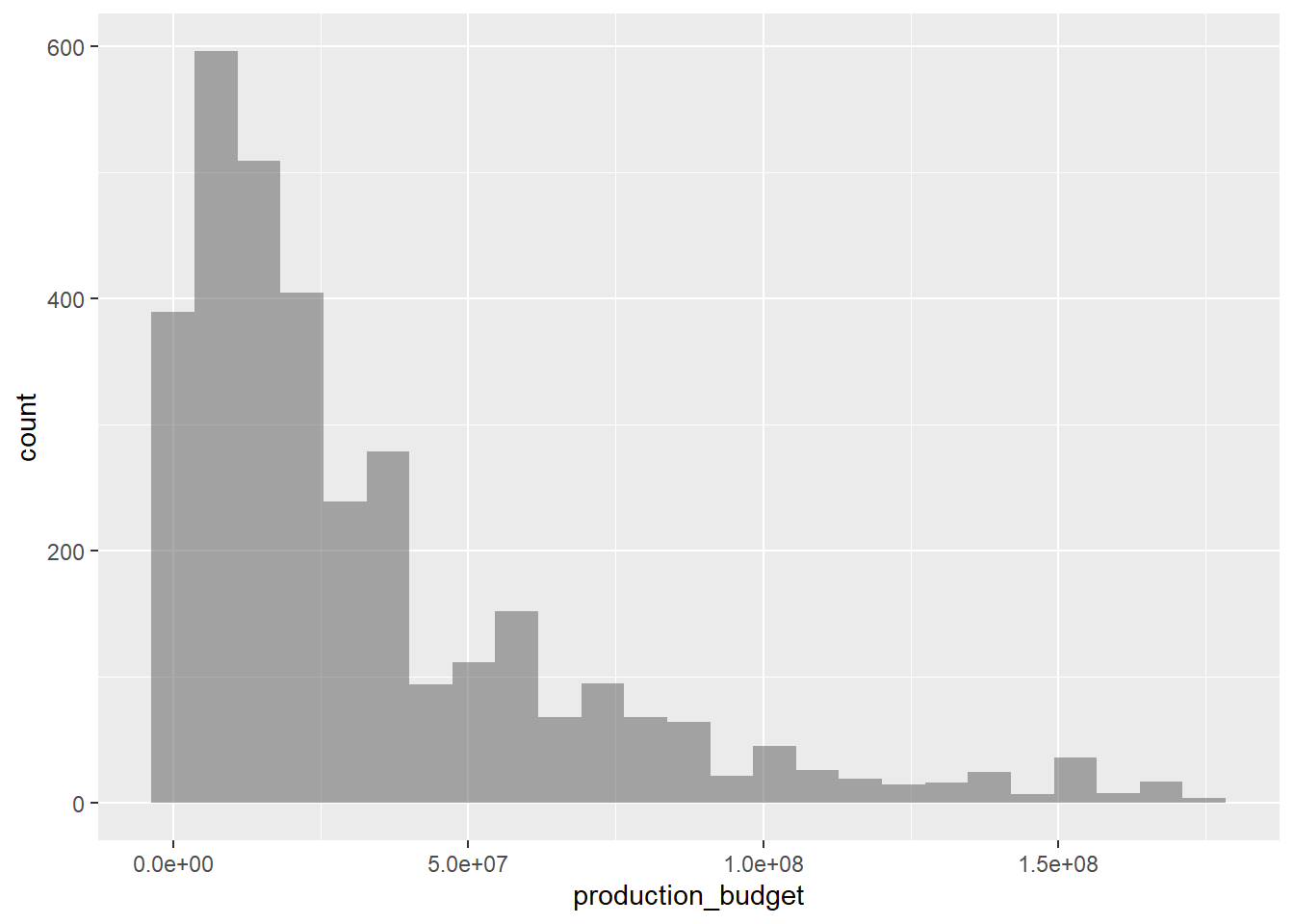
The histogram of production budgets reveals a right-skewed distribution, indicating that most films have lower budgets. A significant number of movies fall within the lower budget range, while high-budget films are less common. This implies that filmmakers often work with limited financial resources.

Domestic gross

movies_modified %>%
  gf_histogram(~domestic_gross)

Observations:

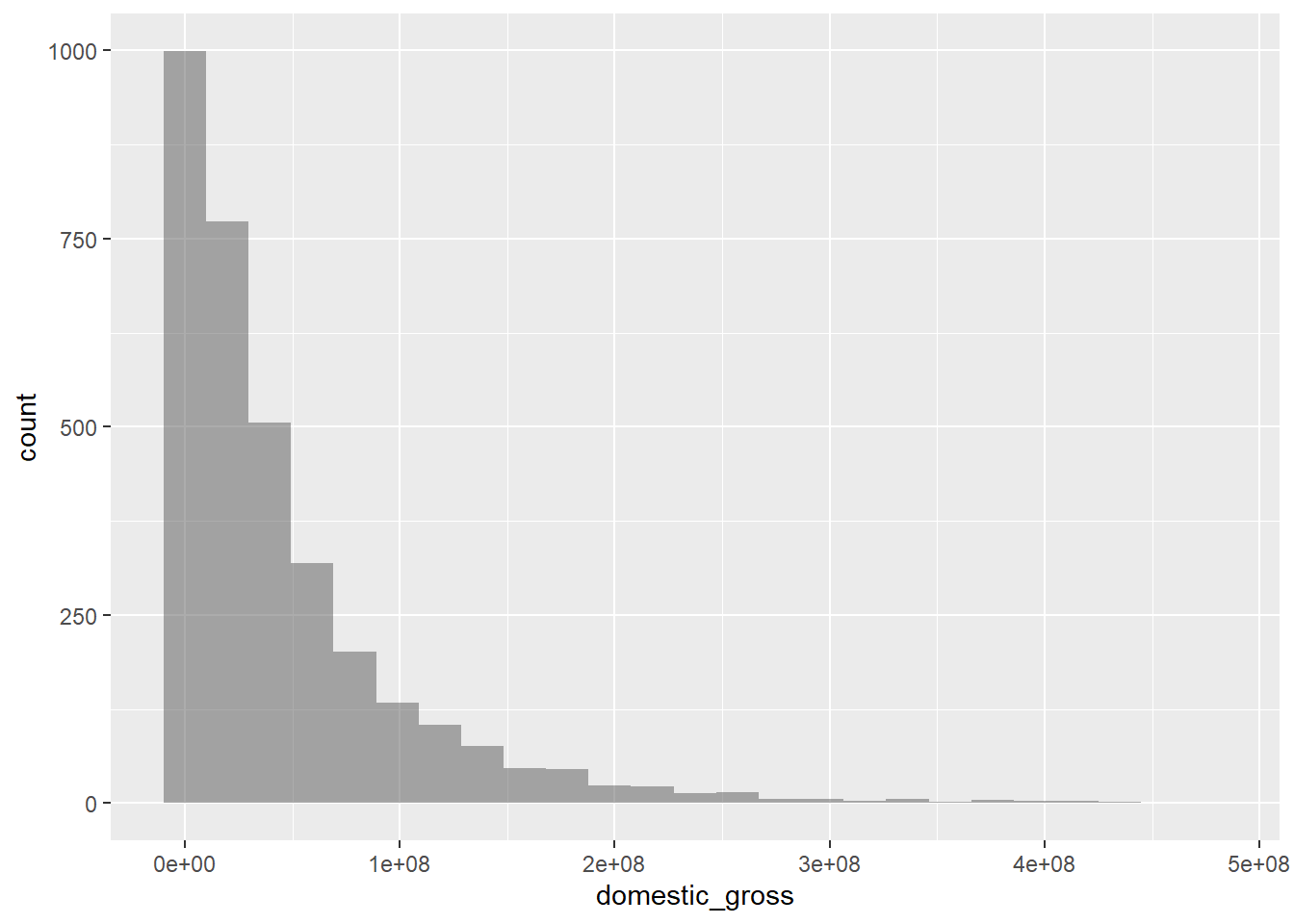
The histogram of domestic gross revenue shows a right-skewed distribution, indicating that most films generate low to moderate earnings. A significant number of movies earn little to no domestic gross, while only a few achieve high earnings.

Worldwide gross

movies_modified %>%
  gf_histogram(~worldwide_gross)

Observations:

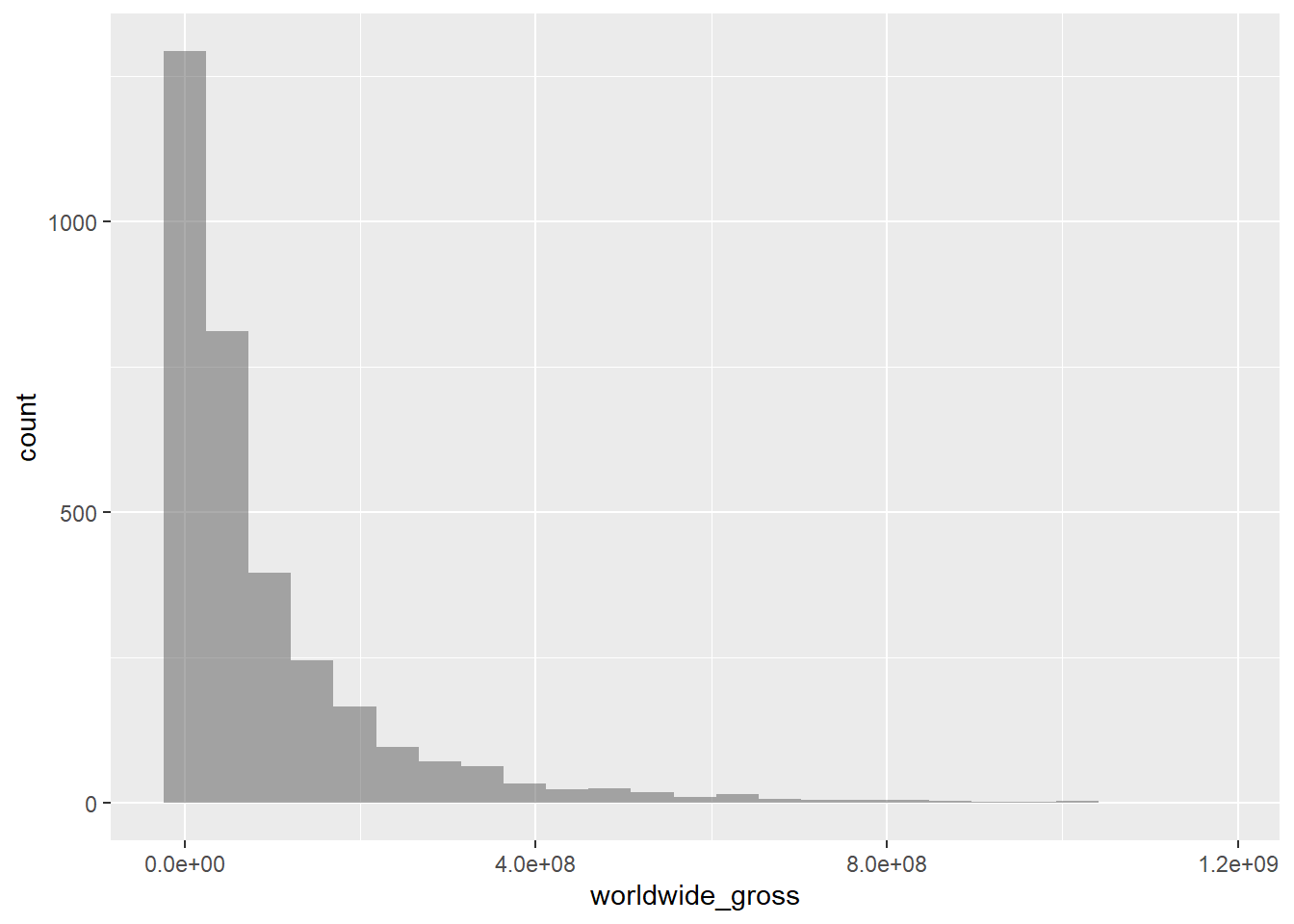
The histogram of worldwide gross revenue displays a right-skewed distribution, similar to the other analysis. Most films earn relatively low revenue, with a significant number reporting little to no earnings. A small number of movies, however, achieve substantial worldwide gross, indicating the competitive landscape of the global film industry.

Profit ratio

movies_modified %>%
  gf_histogram(~profit_ratio)

Observations:

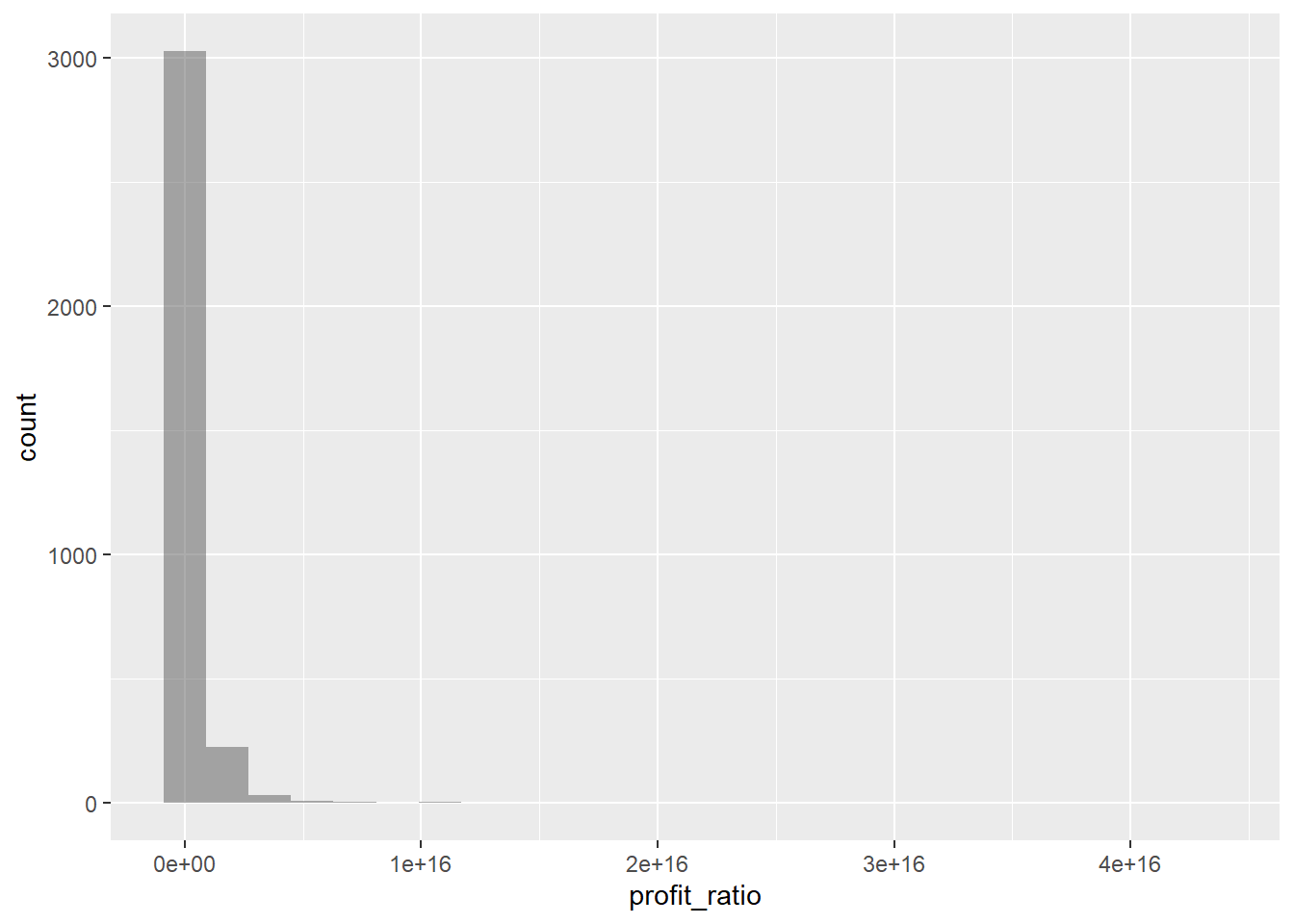
Most data points are clustered near zero, with a sharp drop-off after the initial bar. The skewed nature of the graph suggests that the majority of movies have very low profit ratios, while only a few exhibit extreme values, indicating a highly unequal distribution of profits.

Research Questions

  1. How do production budget and genre together influence the profit ratio of a movie?
  2. How do domestic gross and distributor type affect the overall worldwide gross of a movie?

Plot

Notes:

  • stat_summary: This function in ggplot2 allows you to summarize data in various ways before plotting.

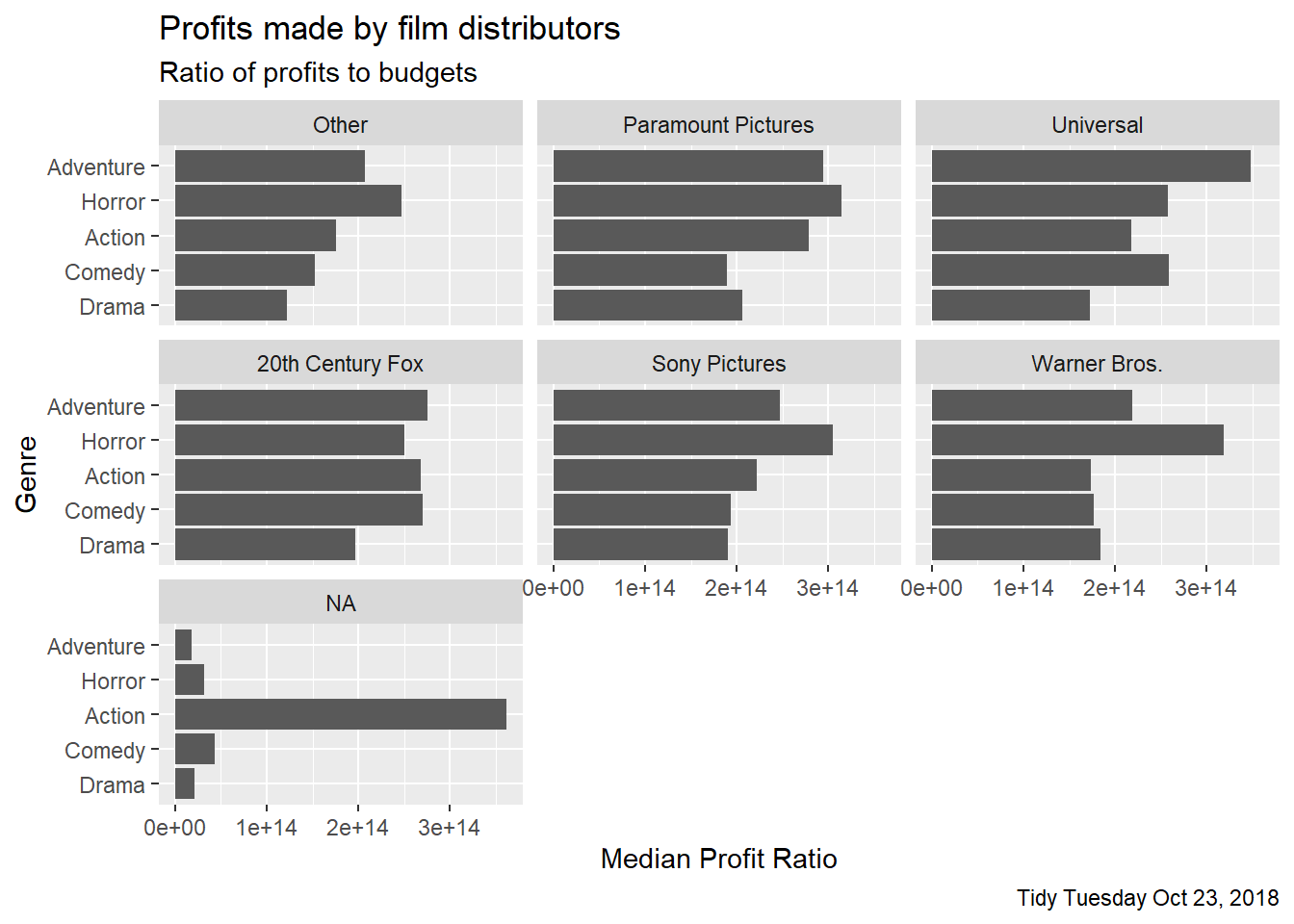
  • geom = “bar”: This specifies that the summarized data will be shown as bars. A bar is created for each genre, showing the median profit ratio for that genre within each distributor facet. Since you are using stat_summary, the height of the bar represents the calculated median value of profit_ratio.

Using ggformula

##gf_barh( ~ genre | distributor, data = movies_modified) %>% 
      ##gf_lab(y = "Genre", x = "Median Profit Ratio",
       ##title = "Profits made by film distributors")

Using ggformula (bar instead of barh)

##gf_bar( ~ genre | distributor, data = movies_modified, 
         ##ylab = "Genre", xlab = "Median Profit Ratio", 
         ##title = "Profits made by film distributors")
##ggplot(movies_modified, aes(x = profit_ratio, y = genre)) +
  ##facet_wrap(vars(distributor)) +
  ##labs(title = "Profits made by film distributors", 
      ## x = "Median Profit Ratio", 
       ##y = "Genre")
ggplot(movies_modified, aes(x = profit_ratio, y = genre)) +
  facet_wrap(vars(distributor)) +
  stat_summary(fun = "median", geom = "bar") +
  labs(title = "Profits made by film distributors", 
       subtitle = "Ratio of profits to budgets",
       caption = "Tidy Tuesday Oct 23, 2018", 
       x = "Median Profit Ratio", 
       y = "Genre")

median_profit_ratios <- movies_modified %>%
  group_by(genre) %>%
  summarize(median_profit_ratio = median(profit_ratio, na.rm = TRUE))

median_profit_ratios
# A tibble: 5 × 2
  genre     median_profit_ratio
  <fct>                   <dbl>
1 Drama                 1.52e14
2 Comedy                1.87e14
3 Action                2.19e14
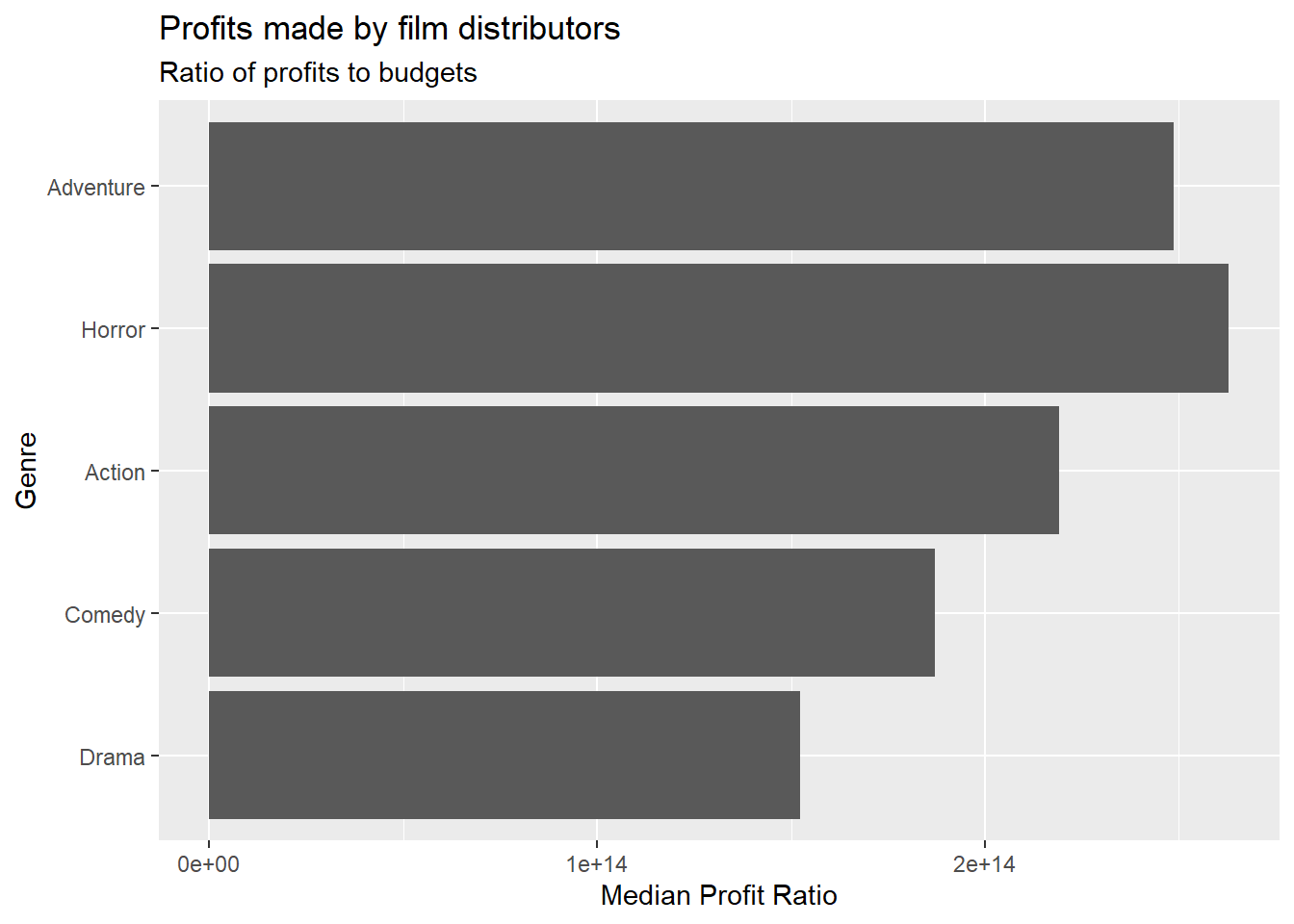
4 Horror                2.63e14
5 Adventure             2.49e14

In ggformula, plotting a graph where one variable is quantitative (numerical) and the other is qualitative (categorical) isn’t directly supported for certain plot types like bar plots. The functions in ggformula, such as gf_barh() and gf_bar(), typically expect categorical data, especially on the x-axis. When you try to combine a categorical variable with a numeric one, ggformula lacks the built-in functionality to calculate and display summary statistics like medians or means, which is often necessary when one axis involves quantitative data. Additional gf_barh() is not accepted as the function is no longer supported or recommended for use in ggformula. Instead, ggformula suggests using the gf_bar() function to create bar plots. However, gf_bar() plots vertical bars, not horizontal ones.

In contrast, ggplot2 handles this more effectively through functions like stat_summary(), which calculates summary statistics, such as the median, directly within the plot creation process. This means that ggplot2 can handle the combination of quantitative and qualitative variables by automatically computing statistics before plotting. Whereas, in ggformula, you would need to pre-process and summarize your data separately before plotting.

Plot Analysis

  1. Type of plot.

    The plot is a bar chart (using ggplot), specifically a dodge bar chart that displays the median profit ratio for different movie genres, separated by film distributor.

  2. What are the variables used to plot this graph?

    X-axis: Genre - the genre of the movie.

    Y-axis: Median Profit Ratio - the median of the ratio of profits to budgets.

    Faceting Variable: Distributor - the film distributor. Its used to create separate panels for each distributor.

  3. If you were to invest in movie production ventures, which are the two best genres that you might decide to invest in?

    ggplot(movies_modified, aes(x = genre, y = profit_ratio)) +
      stat_summary(fun = "median", geom = "bar") +
      labs(title = "Profits made by film distributors", subtitle = "Ratio of profits to budgets", x = "Genre", y = "Median Profit Ratio")+  
      coord_flip()

    If one were to invest in movie production ventures, the two best genres to consider would be Horror and Adventure. Based on the graph, Horror films show a notably high median profit ratio across various distributors, indicating their ability to generate substantial profits relative to their budgets. This genre has a dedicated fan base, and films often attract audiences, especially during peak seasons like Halloween. Investing in Horror films could bring in significant returns, given their financial success and proven ability to draw in crowds.

    Adventure films also stand out in terms of profitability. The data suggests that they outperform genres like Drama, Action, and Comedy when considering the median profit ratios. This strong performance highlights a promising return on investment for films in this genre. Adventure films often feature engaging storytelling and visual effects, which can capture audiences and drive unimagnable box office success.

    Interestingly, both Horror and Adventure genres have fewer films on the list compared to Drama, Action, and Comedy. Despite having less productions across all distributors, their higher profitability suggests a potential gap in the market. With fewer films, there is less competition, creating opportunities for small-budget productions. By focusing on these genres, investors can capitalize on their profitability while meeting audience demand for quality Horror and Adventure.

  4. Which R command might have been used to obtain the separate plots for each distributor?

    The R command used to create separate plots for each distributor in the graph is:

    facet_wrap(vars(distributor))

    This command allows for the creation of multiple subplots (facets) in one plot, where each subplot corresponds to a different distributor, allowing for easier comparison across them.

  5. If the original dataset had BUDGETS and PROFITS in separate columns, what pre-processing might have been done to achieve this plot?

    If the original dataset had separate columns for BUDGETS and PROFITS, several pre-processing steps would be necessary. First, a new column for profit_ratio would be created by dividing PROFITS by BUDGETS. Next, any missing values in the BUDGETS or PROFITS columns would need to be removed, hence cleaning the dataset or dropping values. Relevant columns would also be converted to appropriate data types, such as factors for qualitative variables like genre and distributor.

Inferences and My Journey

In my exploration of the qualitative aspects of the movie profit dataset, I found the analysis of variables like the decade of release and distributor type to be particularly enlightening. By examining the decade of release, I discovered intriguing patterns in the industry, such as the increasing trend of multiple films being released on the same date, especially in recent years. This phenomenon suggests a highly competitive landscape where studios strategically choose release dates to maximize box office potential. Furthermore, my analysis of distributors revealed a significant presence of smaller or independent companies in the market, which play a crucial role in diversifying the types of films available to audiences.

Understanding the dynamics between major studios and independent filmmakers provided me with valuable insights into the competitive nature of the film industry. I learned that while major studios often dominate in terms of budget and marketing, independent companies can reach audiences by offering unique storytelling and innovative concepts. This different types of distributors showed how important it is to have variety in film production, which makes the film industry more interesting. Additionally, analyzing the varying profit ratios across genres and distributors showed me how certain films and genres can thrive with audiences, revealing opportunities for future investments and productions. Specifically, Horror and Adventure films stand out due to their high median profit ratios and dedicated fan bases, suggesting that investing in these genres could lead to significant returns despite their fewer productions compared to Drama, Action, and Comedy.

As I progressed through this analysis, I realized that the research questions I initially formulated differed from the final graphs I plotted. My original questions focused on understanding how production budgets and genres influenced profit ratios, as well as comparing domestic gross and worldwide gross across different distributors. However, as I worked on replicating the graph with code, I found that the median profit ratios for various genres by distributor provided a more comprehensive view of profitability trends. This shift in focus highlighted the importance of being flexible and responsive to the data, as it can lead to unexpected yet valuable findings.

Working with visualization libraries like ggplot2 and ggformula was a significant part of my learning journey. I enjoyed creating various plots, especially bar charts, to illustrate the median profit ratios for different genres across distributors. Utilizing the stat_summary() function in ggplot2 allowed me to visualize summary statistics directly, which made my analysis more efficient. Creating separate facets for each distributor helped me see how profit ratios differed, making comparisons easier and more meaningful.

Since I had not previously used ggplot2 to create graphs, I initially relied on ggformula for my code. However, I faced challenges because ggformula does not support combinations of quantitative and qualitative variables in plotting, which was frustrating at times. This experience helped me understand the strengths and limitations of different packages and functions. As a result, I learned how to use ggplot2 by referring to code examples on the website and ChatGPT.